
ZapierPro
Send every submission to Zapier and on to thousands of apps.
Requires Neural Forms Pro (with Lite installed and active).
1. Create the Zap#
- In Zapier, create a Zap with the trigger Webhooks by Zapier → Catch Hook.
- Copy the webhook URL Zapier gives you (it starts with
https://hooks.zapier.com/hooks/catch/).
2. Add it to Neural Forms#
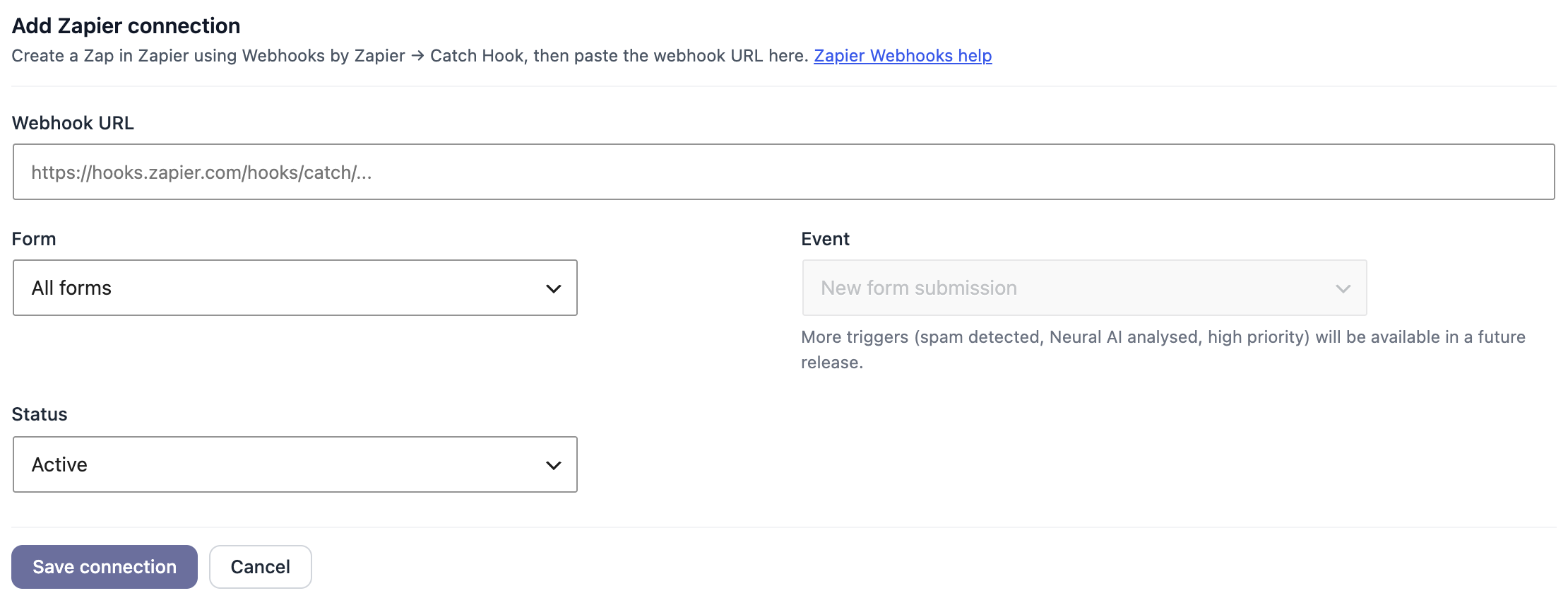
- Go to Neural Forms → Integrations → Zapier and click Add Zapier connection.
- Paste the Webhook URL.
- Under Form, choose All forms or a single form.
- Leave Event on New form submission and Status on Active.
- Click Save connection. Add as many connections (Zaps) as you need.
3. Choose Zaps per form#
In the form builder, open Settings → Integrations → Zapier, turn on Send submissions to Zapier when this form is submitted and tick the Zaps that should receive this form’s entries. Inactive Zaps are skipped.
4. Test it#
Submit the form once, then click Test trigger in Zapier. The fields from your submission appear for mapping into the next step of your Zap.
Today the trigger is every new submission. Triggers for spam detected, AI analysed and high priority are planned.