
Form Builder
The drag and drop form builder for WordPress
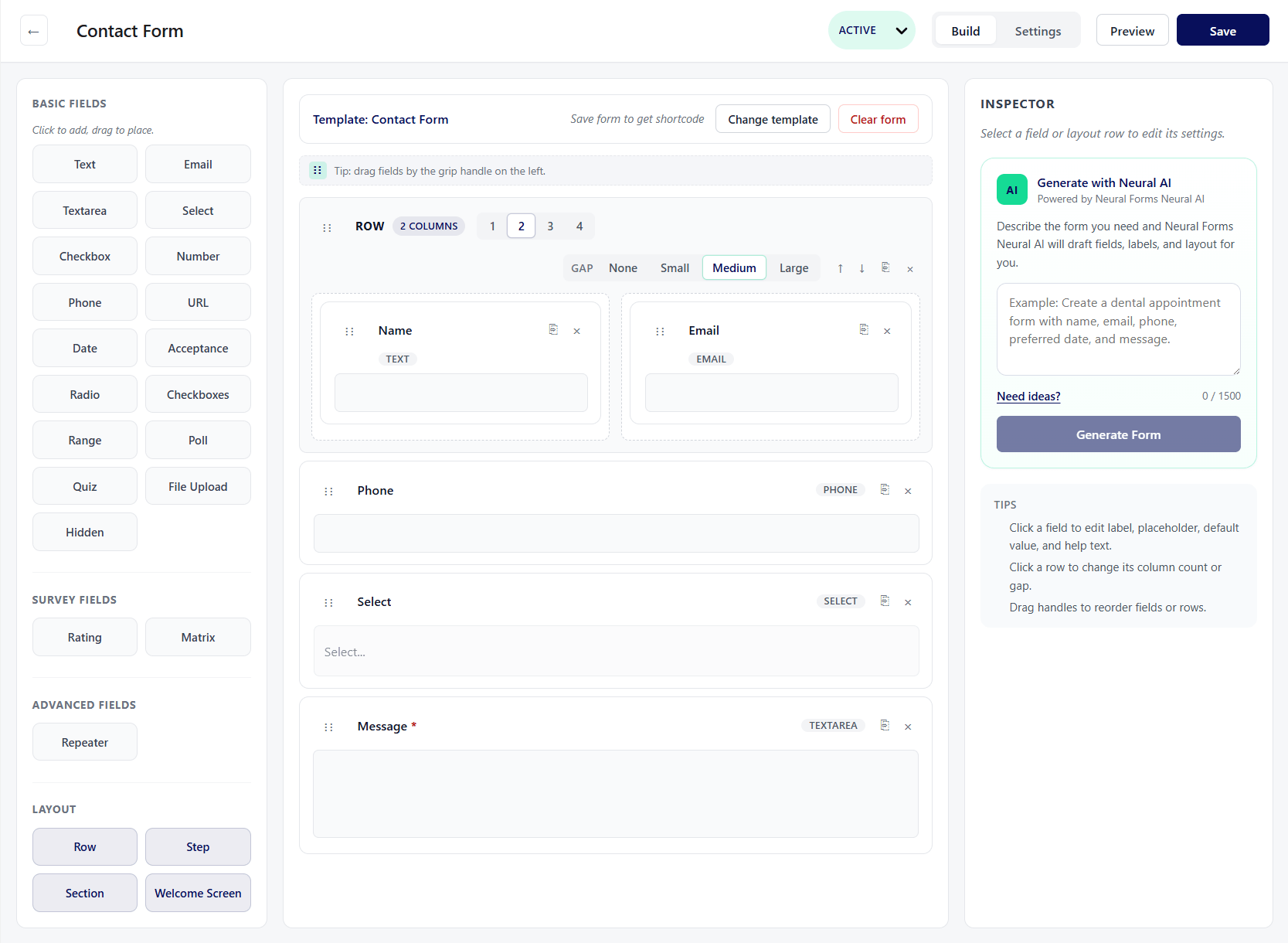
Drag fields onto a canvas, arrange them in responsive rows and columns, and see a live preview as you work — then let AI help build and manage what you collect.
How It Works
Everything you need to build any form
Seven builder capabilities that cover layout, logic, and speed.
Drag and drop canvas
Add and reorder fields visually with live preview. No page reload. See exactly what your visitors will see as you build.
18 free field types
Text, email, textarea, select, checkbox, checkboxes, radio, number, phone, URL, date, acceptance, range, poll, quiz, file upload, hidden, and rating.
Row and column layouts
Arrange fields in 1 to 4 columns that stay responsive on mobile. Build side-by-side name fields, address blocks, or any custom layout.
Multi-step forms
Split longer forms into steps with a progress bar. Job applications, booking forms, and order forms convert better as multi-step sequences.
Conditional logic
Show or hide fields based on earlier answers. A quote request form can reveal industry-specific questions based on the selected service type.
Built-in validation
Field validation works out of the box — required fields, email format, character limits, and patterns. Plus a Divi 5 module and a Gutenberg block.
One-click templates
Start from a proven layout — contact form, feedback form, job application, and more. Import with one click, then customize every field.
Why It Matters
Building the form is the start, not the end
A form builder is only as good as the layout and logic it lets you control. Neural Forms gives you multi-column rows, multi-step pages, and conditional logic without code, then adds AI generation and a lead inbox on top, so building the form is the start of the workflow, not the end of it.
Use Cases
AI-powered forms for every scenario
Related Features
Features that extend the builder
The builder is the foundation — these features make it smarter.
Form templates
Pre-built templates for contact, feedback, application, and more. One click to import into the builder.
Conditional logic
Show or hide fields based on user answers. Build smart forms that adapt to each respondent.
File upload form
Drag-and-drop file upload with size limits, type restrictions, and multi-file support.
FAQs
Frequently asked questions
Yes. The drag-and-drop builder, 18 field types, and templates are in the free Lite plugin.
Yes. Split any form into steps with a progress bar.
Yes. Arrange fields in 1 to 4 responsive columns per row.
No. The builder is drag and drop, and AI can generate a form from a description on paid plans.
Yes. Neural Forms includes a Divi form module and a Gutenberg block.
Neural Forms
Start building forms the smart way
Download Neural Forms Lite free with the drag-and-drop builder, 18 field types, and templates. Upgrade for AI, conditional logic, and more.
30-Day Money Back Guarantee. No Questions Asked!