
Matrix field
Ask many rating questions in one grid
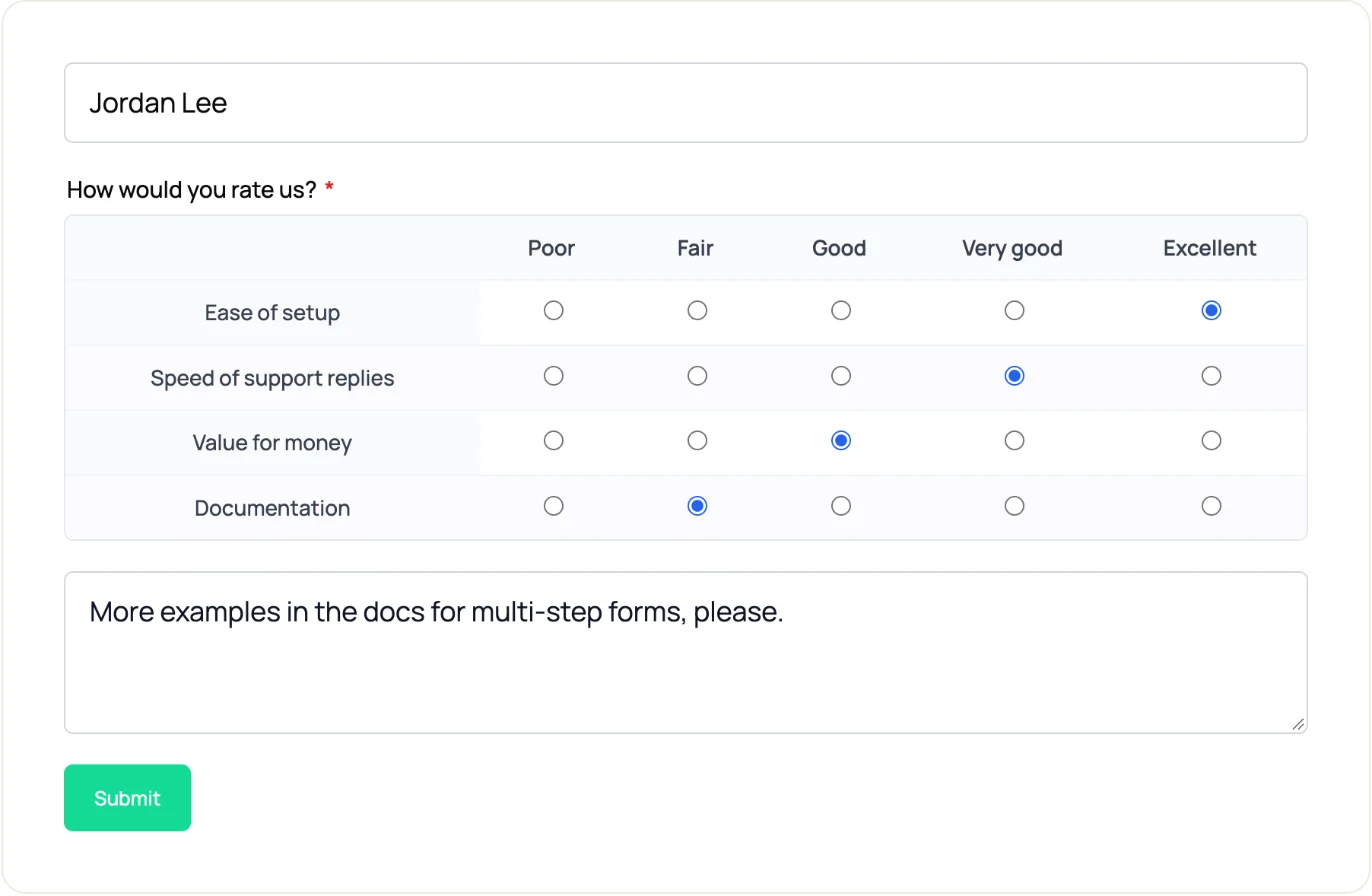
The Matrix field puts your statements in rows and one shared answer scale in columns, so a visitor rates them all in one place instead of answering a separate question for each.
Available on Starter ($99/yr) and Agency ($199/yr). Not in the free Lite plugin.
The basics
What a matrix question is
Each row is a statement or an item. The columns are one answer scale that every row shares, and the visitor picks an answer in each row. When the columns run from one opinion to its opposite, the grid is a Likert scale.
| Statement | Strongly disagree | Disagree | Neutral | Agree | Strongly agree |
|---|---|---|---|---|---|
| The guide explained the safety rules clearly | ○ | ○ | ○ | ○ | ○ |
| The kayaks and gear were in good condition | ○ | ○ | ○ | ○ | ○ |
| The tour was worth the price | ○ | ○ | ○ | ○ | ○ |
| I would book another tour with you | ○ | ○ | ○ | ○ | ○ |
Form builder
Build a matrix in the form builder
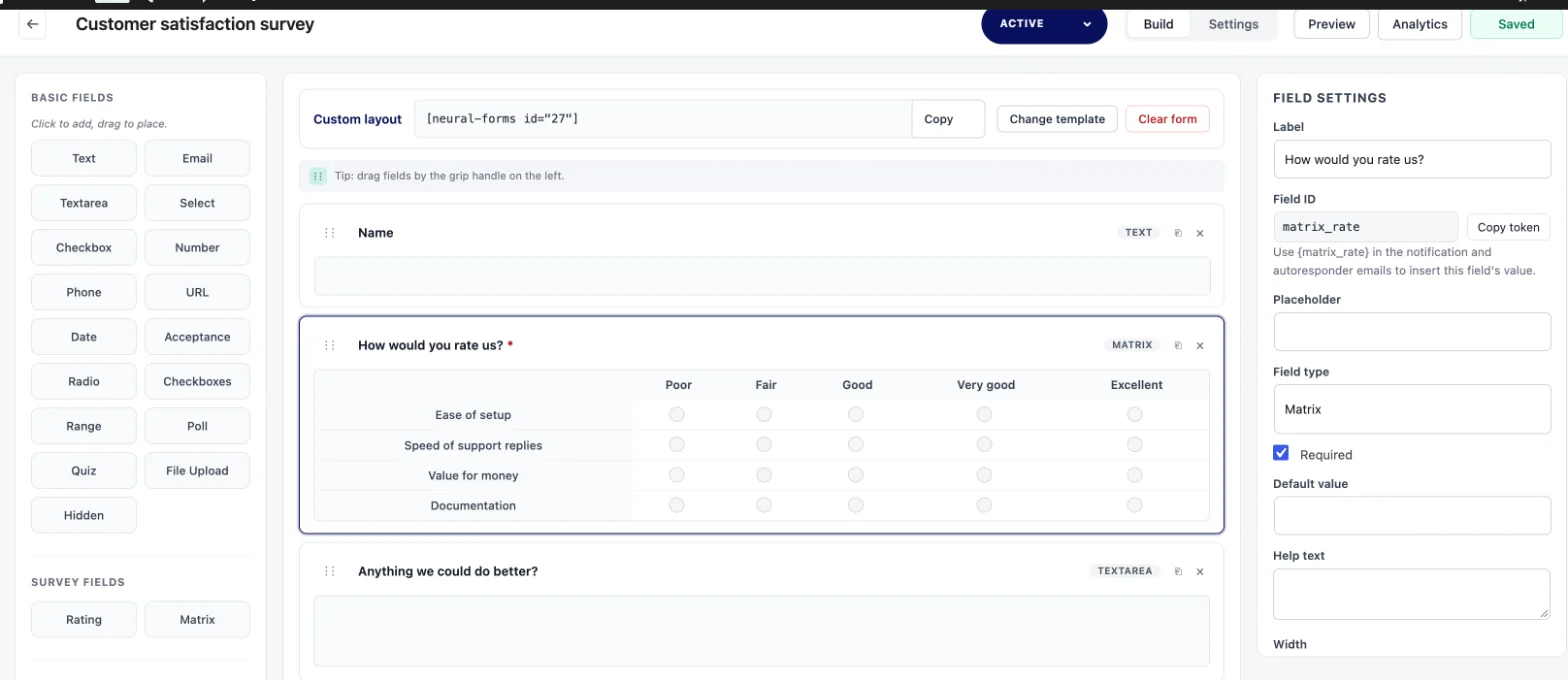
Add Matrix from the Survey group of the field picker, then set it up in the field settings panel. These are the four settings that shape the grid.
Rows
Add a row for each statement or item you want rated, rename it, or remove it. New rows start as Row 1, Row 2 and so on until you type your own wording.
Columns
Add the answer scale every row shares: Strongly disagree to Strongly agree, Poor to Excellent, or Not important to Very important. Each column has a label and a stored value.
One answer per row or several
Selection type sets the input. Single choice per row (radio) suits rating and Likert scales. Multiple choices per row (checkbox) suits “which of these apply” grids.
Column scores
Each column can carry a number. New columns start at 1, 2, 3 and so on, and you can change any of them, so Strongly agree can be worth 5 and Strongly disagree 1.
Use cases
Where a matrix fits
Four grids you can copy. Each one replaces four or five separate questions with a single field.
Customer satisfaction
Rows: product quality, delivery time, support, value for money. Columns: Very dissatisfied, Dissatisfied, Neutral, Satisfied, Very satisfied.
Course or event evaluation
Rows: the content, the speaker, the venue, the pace. Columns: Poor, Fair, Good, Very good, Excellent.
Employee pulse
Rows: I know what is expected of me, I have the tools I need, My work is recognized. Columns: Strongly disagree, Disagree, Neutral, Agree, Strongly agree.
Feature importance
Rows: the features you are weighing. Columns: Not important, Somewhat important, Very important. Or switch to several answers per row with columns such as Use today and Want next.
Entries
What happens to the answers
Each response lands in the lead inbox with the rest of the entry, so the ratings sit next to the person’s name, email and comments.
- The entry shows each row of the grid with the answer the person picked
- Admin notification emails list the matrix one row per line
- Export entries to CSV (up to 5,000 rows per export, Excel-friendly) and work out averages in a spreadsheet
- When AI analysis runs on the entry, it reads the matrix as rows, columns and column scores instead of raw data

Works with
Works with the rest of Neural Forms
Building a full questionnaire? See the survey form for WordPress and all 20 field types.
- One of 20 field types, so the same form can also ask for a name, an email address, a star rating or a comment
- Label, help text, a required switch and full or half width, like other fields
- Show the form with the Neural Forms block, the
[neural-forms]shortcode, or the Neural Form module for Divi 5 - Entries go to the same lead inbox as your other forms, with search, views and bulk actions
- Automatic AI analysis of each entry on Starter and Agency
- A Matrix cannot go inside a Repeater; place it in the main form
Plans
Matrix in Lite vs paid plans
Matrix and Repeater are the only field types that need a paid plan. The other 18 work in the free Lite plugin.
| Lite (free) | Starter and Agency | |
|---|---|---|
| Matrix in the field picker | Shown, locked | Available |
| Matrix on the live form | Not shown; the rest of the form still works | Shown |
| Rows, columns, one or several answers per row | No | Yes |
| Column scores | No | Yes |
| Price | Free | Starter $99/year, Agency $199/year, unlimited sites |
If the paid plugin is switched off later, the Matrix field stays in the form. Visitors see the rest of the form, and administrators see a one-line notice where the grid was.
FAQs
Frequently asked questions about the Matrix field
What is a matrix question in a survey?
A matrix question is a grid. Each row is a statement or item, and the columns are one answer scale shared by every row. The person answers each row on the same scale, which keeps a set of related ratings short and comparable.
What is the difference between a matrix question and a Likert scale?
A Likert scale is an answer scale, usually five or seven points from Strongly disagree to Strongly agree. A matrix is the layout. A matrix with Likert columns asks several Likert questions at once, and a matrix can also use other scales, such as Poor to Excellent.
Can people choose more than one answer in each row?
Yes. Set Selection type to Multiple choices per row (checkbox). Keep Single choice per row (radio) for rating scales, where one answer per row is what you want.
Can I give the answer columns a score?
Yes. Each column has an optional score, and new columns start at 1, 2, 3 and so on. The scores are saved with the field and sent along with the answers when AI analysis runs on the entry. For averages, export the entries to CSV and calculate them in a spreadsheet.
Is the Matrix field in the free version of Neural Forms?
No. Matrix and Repeater are the two field types that need a paid plan. Lite shows Matrix as locked in the field picker. Starter ($99/year) and Agency ($199/year) unlock it, on unlimited sites.
How many rows should a matrix question have?
There is no fixed rule. Many survey writers keep a grid to about five to seven rows so people keep reading each statement instead of clicking down one column. Split a longer list into two matrix fields, each with its own label.
Can I put a Matrix field inside a Repeater?
No. A Repeater can hold text, email, phone, number, URL, textarea, select, radio, checkbox, checkboxes, date and file fields. Matrix, poll, quiz and layout blocks are not allowed inside it.
Neural Forms
Add a rating grid to your next survey
The Matrix field comes with Starter ($99/year) and Agency ($199/year), along with the Repeater field, automatic AI analysis of every entry and five integrations. Both plans cover unlimited sites.
30-day money-back guarantee on paid plans