Zapier Integration
Connect forms in WordPress to 6,000+ apps with Zapier
Every form submission triggers a Zapier webhook in real time. Send data to Slack, Google Sheets, Notion, Airtable, Trello, Asana, Gmail, Salesforce, ClickUp, and thousands more apps. No custom webhook code, no separate connector plugin to maintain.
The Zapier integration is included in Neural Forms Pro (Starter $99/year and Agency $199/year) and covers unlimited sites.
Features
Everything you need to send forms data from WordPress to Zapier
Real-time webhooks
Data is sent to Zapier at the moment of form submission. No polling, no cron delays, no batching. Your Zap fires within one to three seconds of submission, ready to trigger your downstream apps.
Structured JSON payload
Every field value, label, type, and file upload URL is sent as structured JSON. Zapier receives clean, well-formed data that maps easily to any action step. No payload parsing required in Zapier.
Per-form webhook URLs
Each form can have its own Zapier webhook URL. Your contact form triggers one Zap, your order form triggers another, your support form triggers a third. Independent workflows, independent webhook destinations.
Built-in connection test
Test your webhook connection directly from Neural Forms before going live. A test payload is sent to Zapier so you can verify the field data, action steps, and downstream app responses without using a real form submission.
File upload URLs included
When forms include file uploads, the webhook payload includes direct download URLs for each uploaded file. Zapier passes these to Google Drive, Dropbox, OneDrive, or any storage app without intermediate steps.
Per-entry sync status
Every submission shows its Zapier webhook delivery status in the entry detail view. See whether the payload was delivered, the HTTP response code (200 OK, 4xx, 5xx), and the exact error message if the webhook failed.
Custom field mapping
Send selected fields only, not the entire form payload. Filter out internal fields, hidden fields, or sensitive data before sending to Zapier. Configure per-form, with a preview of the final payload before saving.
Compatible with Zapier free, Starter, Professional, Team, and Company plans
The integration uses the Zapier “Webhooks by Zapier” trigger, which is available on Zapier’s free plan up to 100 tasks per month and on all paid Zapier plans without restriction.
How It Works
Connect forms in WordPress with Zapier in under 2 minutes
No developer needed. Your Zapier webhook URL pasted into Neural Forms, and every submission triggers your workflow.
1
Create a Zap in Zapier
Log in to Zapier and create a new Zap. Choose “Webhooks by Zapier” as the trigger app and select “Catch Hook” as the trigger event. Zapier generates a unique webhook URL. Copy it.
2
Paste the webhook URL in Neural Forms
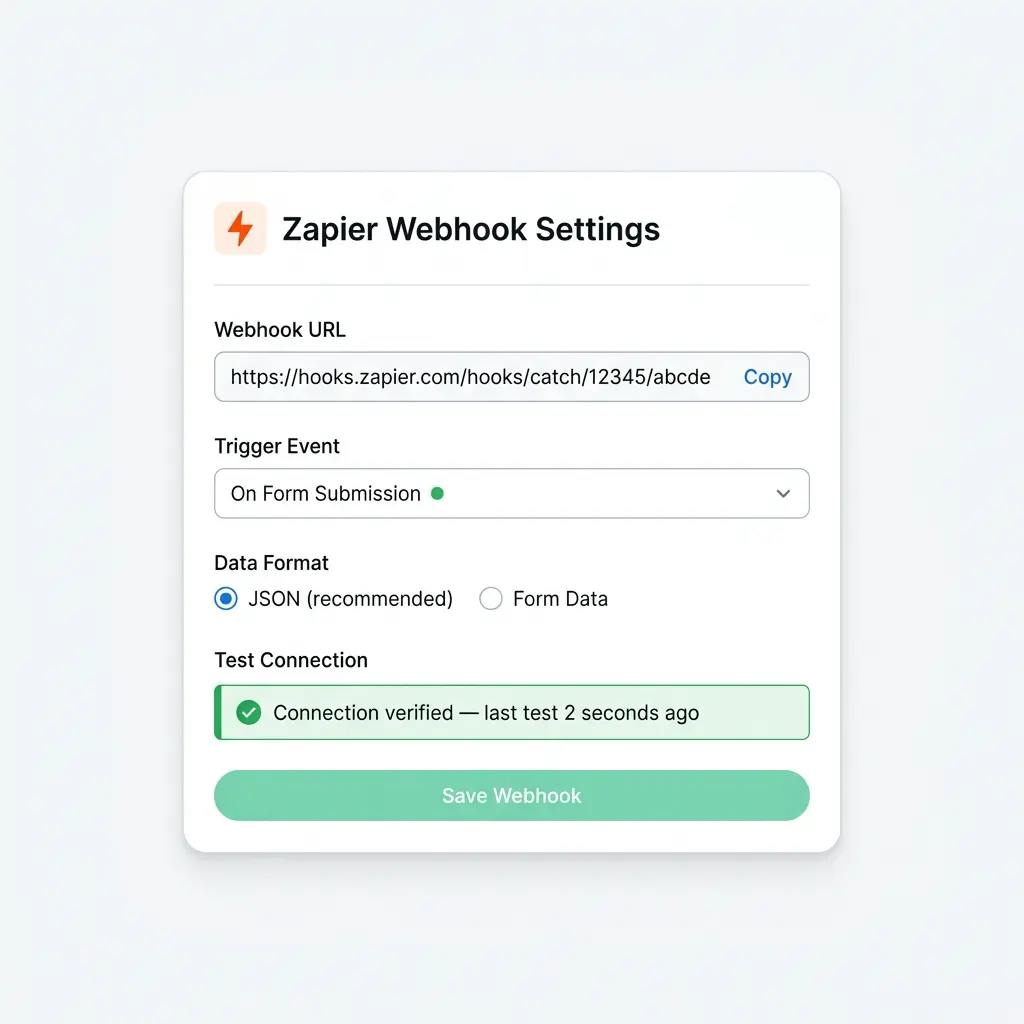
Open any form, go to the Integrations tab, enable Zapier, and paste the webhook URL. Choose the trigger event (on submission), select the data format (JSON recommended), and click Test Connection. Neural Forms sends a sample payload to Zapier so you can map the fields in the next step.
3
Build your workflow in Zapier
Back in Zapier, select the test payload Neural Forms sent so Zapier knows your field structure. Add action steps: send a Slack message, add a row in Google Sheets, create a Notion page, fire a Salesforce action, or trigger any of 6,000+ apps. Publish the Zap and every form submission flows through.
Use Cases
Ready-to-use workflows for forms in WordPress
Slack notification on every submission
Send a formatted Slack message to a channel every time a form is submitted. Include the respondent’s name, email, message excerpt, AI priority score, and a direct link to the entry in the lead inbox. Sales teams know about hot leads in real time.
Log every submission to Google Sheets
Automatically add a new row in a Google Sheets spreadsheet for every form submission. Map each form field to a column for real-time reporting, dashboard tracking, or feeding business intelligence tools downstream.
Create Notion database entries
Every submission creates a new page in a Notion database with form data as properties. Useful for tracking inquiries, candidate applications, customer requests, or content submissions in your team workspace.
Create Trello, Asana, ClickUp, or Monday tasks
Turn every form submission into a task card on your project board. Assign to a team member, set a due date based on submission timestamp, and add form data as the task description. Support requests, bug reports, and feature requests flow directly into your project management tool.
Send custom email via Gmail or Outlook
Trigger a personalized email to the form respondent or your team. Use form field values in the subject line and body for dynamic, context-aware messaging beyond what default email notifications support.
Save uploaded files to Google Drive or Dropbox
When a form includes file uploads, automatically save the uploaded files to a specific cloud storage folder. Organize by date, form name, respondent email, or any field value. The file URLs in the webhook payload mean no manual download-and-reupload steps.
Add subscribers to email tools beyond Mailchimp
Use Zapier to sync subscribers to ActiveCampaign, ConvertKit, Klaviyo, Brevo, MailerLite, Beehiiv, or any email tool not on the native integration list. Map fields, set tags, and trigger automation sequences in your preferred platform.
Trigger Salesforce or Pipedrive workflows
Beyond HubSpot, use Zapier to push form submissions to Salesforce, Pipedrive, Zoho CRM, Copper, or any other CRM. Create leads, update opportunities, or trigger pipeline workflows automatically.
Webhook Setup
Paste your webhook URL, test, and go live
The Zapier integration panel inside the form builder lets you paste your webhook URL, choose the trigger event, select the data format, and test the connection from one screen. A success confirmation appears when your Zap is ready to receive submissions.
One submission, many apps
Trigger workflows across multiple apps from a single submission
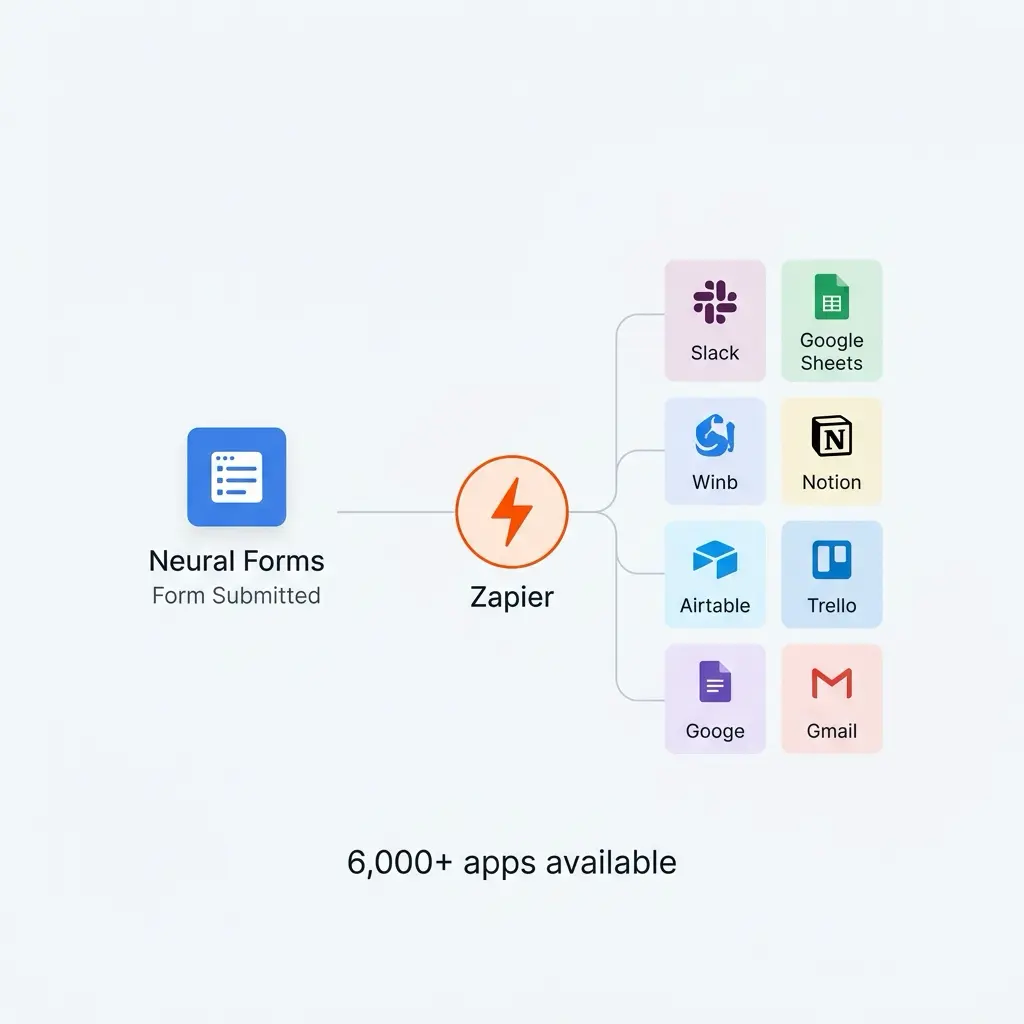
Through Zapier, a single form submission can trigger actions across multiple apps simultaneously. Send a Slack notification, log a row in Google Sheets, create a Trello card, save uploaded files to Google Drive, and email the respondent. All from one form submission, no extra Neural Forms configuration.
AI and Zapier
Every submission is analyzed by AI before triggering your Zap
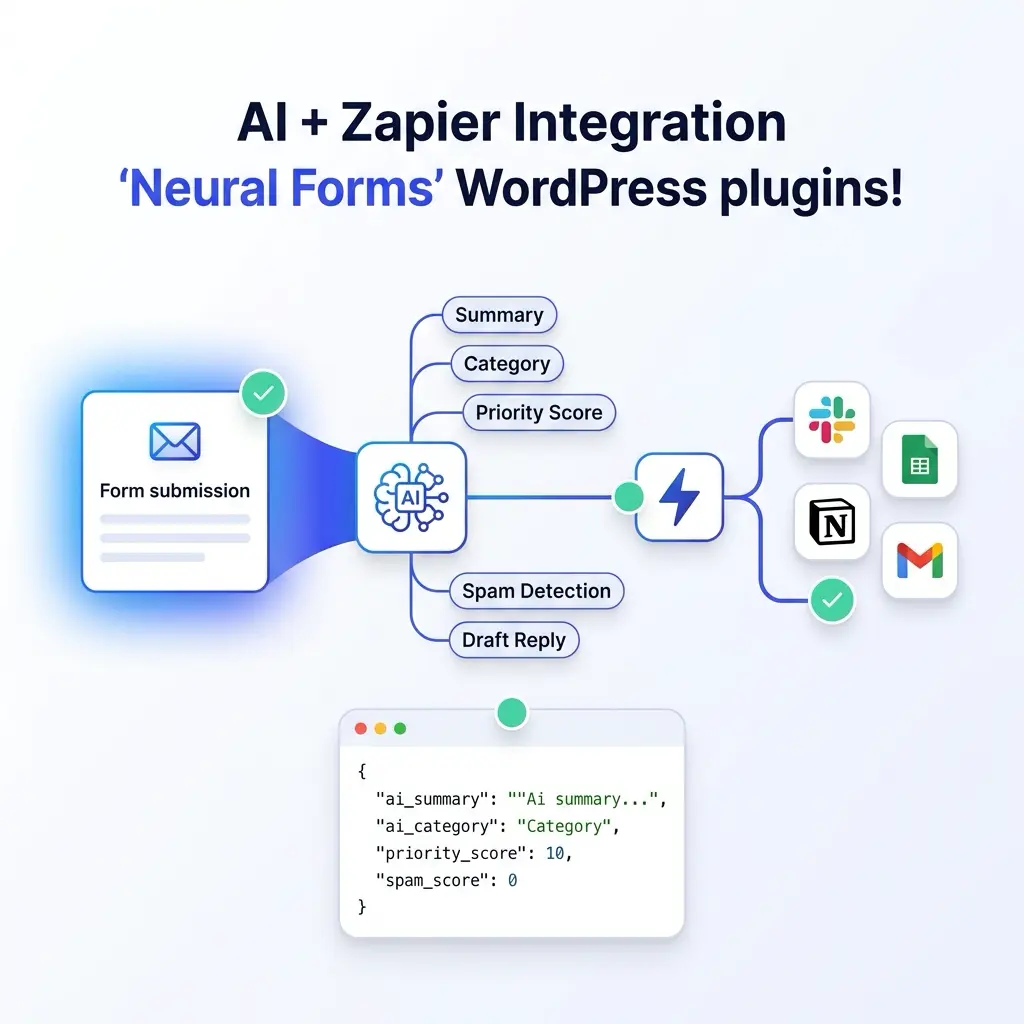
Before a submission triggers your Zapier workflow, Neural Forms has already analyzed it. The AI generates a summary, assigns a category, calculates a priority score, and detects spam. AI metadata is included in the webhook payload, so your downstream apps can route, prioritize, or filter based on AI output.
AI features are included on all paid plans. Starter ($99/year) includes 7,500 AI credits per year. Agency ($199/year) includes 25,000. One credit processes one form submission.
FAQs
Frequently asked questions about the Zapier integration
You can use the Webhooks by Zapier trigger on Zapier’s free plan for up to 100 tasks per month. For higher volumes, multi-step Zaps, or premium app actions, a Zapier paid plan is required. Neural Forms itself includes the Zapier integration in all Pro licenses with no additional charge.
The payload includes every form field’s label, value, and type. It also includes the form ID, entry ID, submission timestamp, page URL, user IP (if Privacy Mode is disabled), AI-generated summary, AI category, AI priority score, and download URLs for any uploaded files.
Each form supports one Zapier webhook URL. For multi-action workflows, create a multi-step Zap in Zapier that triggers multiple actions from a single webhook. Zapier handles the fan-out natively, and a multi-step Zap is more efficient than triggering multiple webhooks.
Yes. All Neural Forms integrations work independently and can be enabled simultaneously on the same form. A single submission can push to HubSpot, Mailchimp, WhatsApp, and Zapier at the same time, each with its own field mapping and configuration.
The form submission is still saved in your WordPress database regardless of webhook delivery status. The entry detail page shows the HTTP response code, the response body if available, and the exact error message. You can also resend the payload manually from the same screen.
The integration uses Zapier’s Webhooks by Zapier trigger for maximum flexibility. A dedicated Neural Forms trigger app on the Zapier marketplace is planned for a future release. Webhook-based integration works on Zapier’s free plan, while published trigger apps typically require paid plans.
Yes. Configure conditional rules: only trigger Zapier if a specific field equals a value, only trigger for non-spam submissions, or only trigger when AI priority score exceeds a threshold. Conditional rules are configured in the form’s Integrations tab.
No. The Zapier webhook is fired asynchronously in the background after the visitor’s form submission completes. The visitor never waits for Zapier or any downstream app to respond. Slow downstream apps do not affect your site’s performance.
Yes. Configure custom field mapping to send selected fields only, exclude hidden or internal fields, or rename payload keys to match what your downstream apps expect. Preview the final payload before saving.
JSON is the recommended format and what Zapier’s “Catch Hook” trigger expects by default. Form Data format is also available for legacy compatibility, but JSON is more flexible and easier to map in Zapier.
More Integrations
Explore other Neural Forms integrations
HubSpot
Auto-map form fields to HubSpot contact properties. Sync submissions to your CRM in real time.
Google Forms
Import Google Forms into Neural Forms with one click. Migration tool plus optional metadata linking.
Mailchimp
Sync form respondents to Mailchimp audiences with merge tag mapping and tag-based segmentation.
Send WhatsApp notifications to up to 10 recipients via the WhatsApp Business API.
Neural Forms
Ready to connect your WordPress forms to 6,000+ apps?
Get Neural Forms Pro to unlock the Zapier integration along with HubSpot, Mailchimp, WhatsApp, and Google Forms. Both Starter ($99/year) and Agency ($199/year) include all five native integrations and cover unlimited sites.
30-Day Money Back Guarantee. No Questions Asked!