HubSpot Integration
Push every form submission from WordPress into HubSpot automatically
Map Neural Forms fields to HubSpot contact properties and every submission creates or updates a CRM contact in real time. No CSV exports, no manual data entry, no separate connector plugin to maintain.
The HubSpot integration is included in Neural Forms Pro (Starter $99/year and Agency $199/year) and covers unlimited sites.
Features
Everything you need to sync forms with HubSpot
Smart auto-mapping
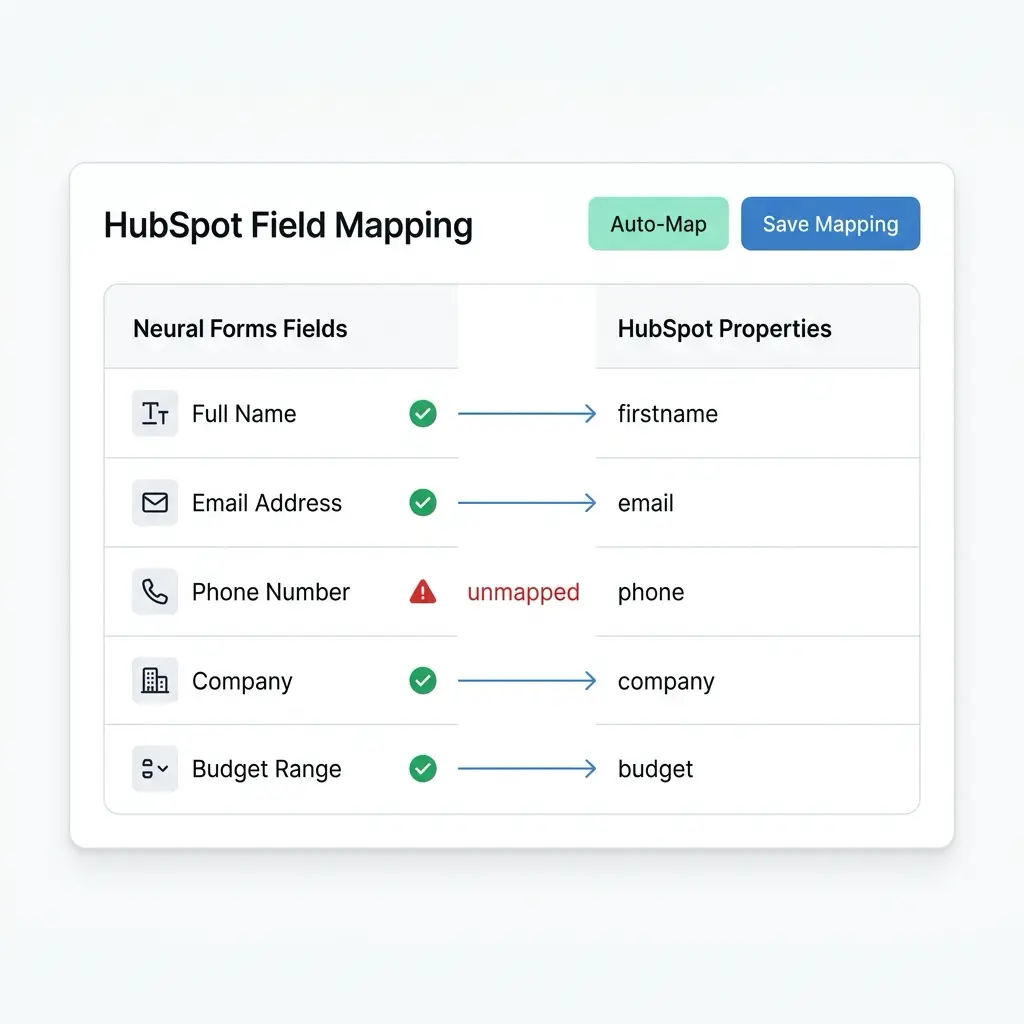
Neural Forms reads your HubSpot contact properties and auto-maps form fields by matching label and type. Email maps to email, phone maps to phone, first name maps to firstname. Review and save.
Create or update contacts
If a contact with the same email already exists in HubSpot, Neural Forms updates the existing record instead of creating a duplicate. Built-in deduplication, no manual cleanup of duplicate contacts later.
Required field warnings
Neural Forms flags any required HubSpot properties not mapped to a form field. Fix mapping gaps before they cause sync failures, not after.
Per-entry sync status
Every submission shows its HubSpot sync status in the entry detail view. See whether the data reached your CRM, when the sync happened, and the exact error message if something failed.
Per-form configuration
Enable HubSpot on specific forms only. Your contact form pushes to HubSpot while your survey form stays local. Each form has its own integration settings.
Custom property support
Map form fields to custom HubSpot contact properties, not just the defaults. Whether you track lead source, customer tier, deal size, or any custom property, Neural Forms supports it.
Encrypted token storage
Your HubSpot Private App Access Token is stored encrypted in your WordPress database and never exposed in API responses. Data flows directly from your WordPress server to the HubSpot API.
Works with HubSpot Free, Starter, Professional, and Enterprise
Neural Forms uses the standard HubSpot CRM API, available on all HubSpot tiers including the free CRM. No HubSpot subscription upgrade required to use the integration.
How It Works
Connect forms in WordPress to HubSpot in under 2 minutes
No developer needed. Your HubSpot API key and a few clicks inside the Neural Forms settings.
1
Add your HubSpot API key
In your HubSpot account, create a Private App with the contacts scope and copy the Access Token. In WordPress, go to Neural Forms > Settings > Integrations, paste the token, and click Test Connection. You see a green confirmation when the connection works.
2
Map your form fields
Open any form, go to the Integrations tab, and enable HubSpot. Neural Forms reads your HubSpot contact properties and auto-maps form fields by label and type. Email maps to email, phone maps to phone, first name maps to firstname. Review the auto-mapped fields, adjust if needed, and save.
3
Publish and sync
Embed your form using the Gutenberg block or shortcode. Every submission creates or updates a HubSpot contact in real time. The sync status appears on each entry in the lead inbox, so you know exactly when data reached HubSpot and what happened if a sync failed.
Use Cases
How teams use Neural Forms with HubSpot
Lead capture and qualification
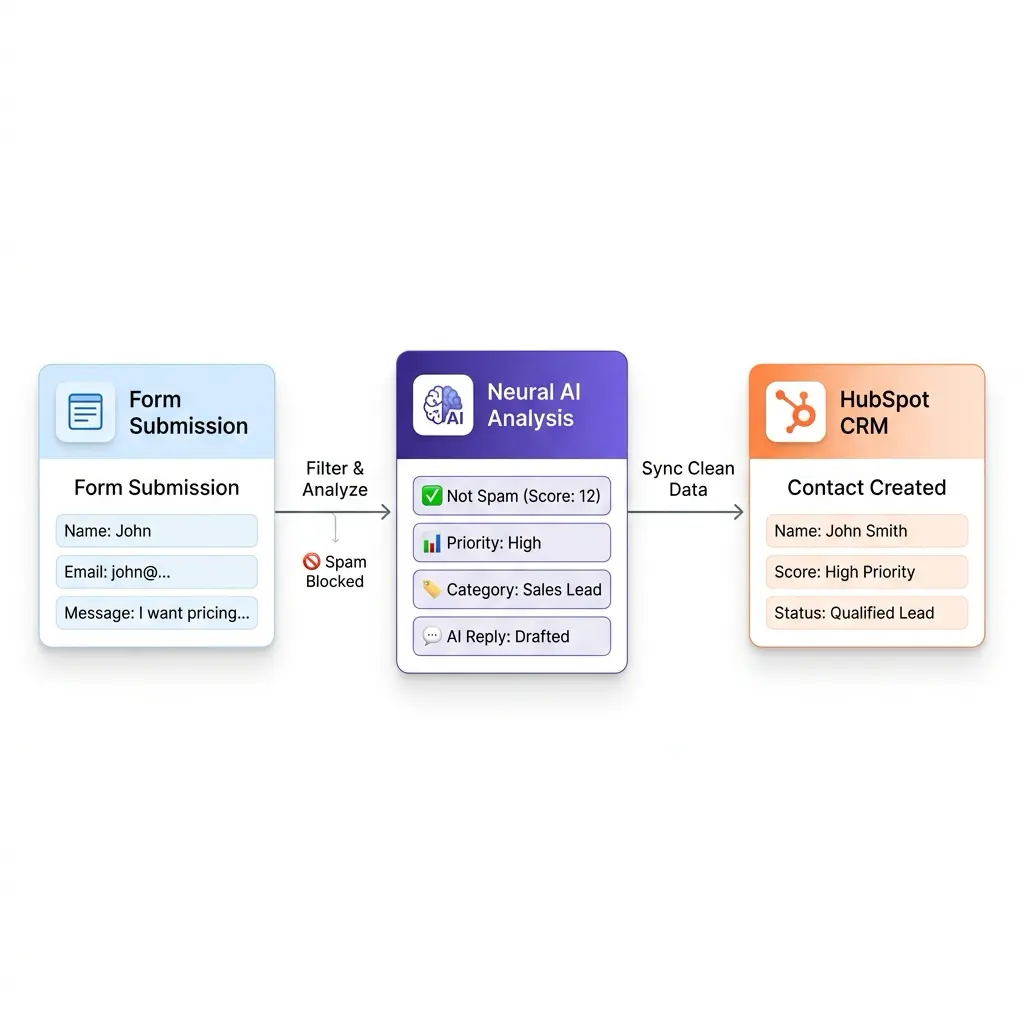
Embed a contact form, demo request form, or quote form on your landing page. Every submission creates a HubSpot contact with mapped properties: name, email, company, budget, lead source. AI categorizes each lead and assigns a priority score before sync, so your sales team works the highest-intent contacts first.
Newsletter and content gating
Gate a whitepaper, ebook, or webinar registration behind a form. Submissions land in HubSpot tagged with the content piece they downloaded. Pair with HubSpot workflows to trigger nurture sequences, follow-up emails, or sales notifications based on the asset.
Event registration
Build a multi-step registration form with attendee details, session preferences, and dietary information. All data syncs to HubSpot contacts with custom properties for the event. Your event team segments attendees, sends targeted communications, and tracks attendance directly from HubSpot.
Support ticket intake with AI triage
Create a support request form with categories, urgency, and a description field. AI categorizes each submission, assigns a priority score (0 to 100), and detects spam before the contact is created or updated in HubSpot. Your support team sees AI-classified, deduplicated, spam-filtered tickets in both Neural Forms and HubSpot.
Field Mapping
Visual field mapper. No guesswork, no code.
The Integrations tab inside the form builder shows every Neural Forms field on the left and every HubSpot contact property on the right. Drag a form field to a HubSpot property, or let auto-mapping match them by label and type. Unmapped required HubSpot fields are highlighted, so sync failures are caught before publishing.
AI + HubSpot
Every lead is triaged by AI before it reaches HubSpot
Before a submission syncs to your CRM, Neural Forms has already analyzed it. The AI generates a summary, assigns a category, calculates a priority score from 0 to 100, and detects spam. Pre-qualified, deduplicated, and clean leads land in HubSpot, ready for your sales team.
AI features are included on all paid plans. Starter ($99/year) includes 7,500 AI credits per year. Agency ($199/year) includes 25,000. One credit processes one form submission.
More Integrations
Explore other Neural Forms integrations
Mailchimp
Sync form respondents to Mailchimp audiences with merge tag mapping and tag-based segmentation.
Zapier
Trigger any of 6,000+ app workflows on form submission. Connect to Slack, Notion, Airtable, and more.
Send WhatsApp notifications to up to 10 recipients via the WhatsApp Business API.
Google Forms
Import Google Forms into Neural Forms with one click. Migration tool plus optional metadata linking.
Neural Forms
Ready to connect your forms in WordPress to HubSpot?
Get Neural Forms Pro to unlock the HubSpot integration along with Mailchimp, Zapier, WhatsApp, and Google Forms. Both Starter ($99/year) and Agency ($199/year) include all five native integrations and cover unlimited sites.
30-Day Money Back Guarantee. No Questions Asked!