
Free poll form
Run polls on your site and show the results
Add a poll to any page, collect one vote per submission and show the totals as a bar or percentage chart after the vote, all the time, or never.
Free in Lite up to 200 votes per poll form. Starter ($99/yr) and Agency ($199/yr) remove the cap.
Setup
Set up a poll
A poll is a form with a Poll field in it, so it lives in the same plugin and the same inbox as your contact forms and quizzes. Want every click? Read the step by step guide to adding a poll.
Poll field
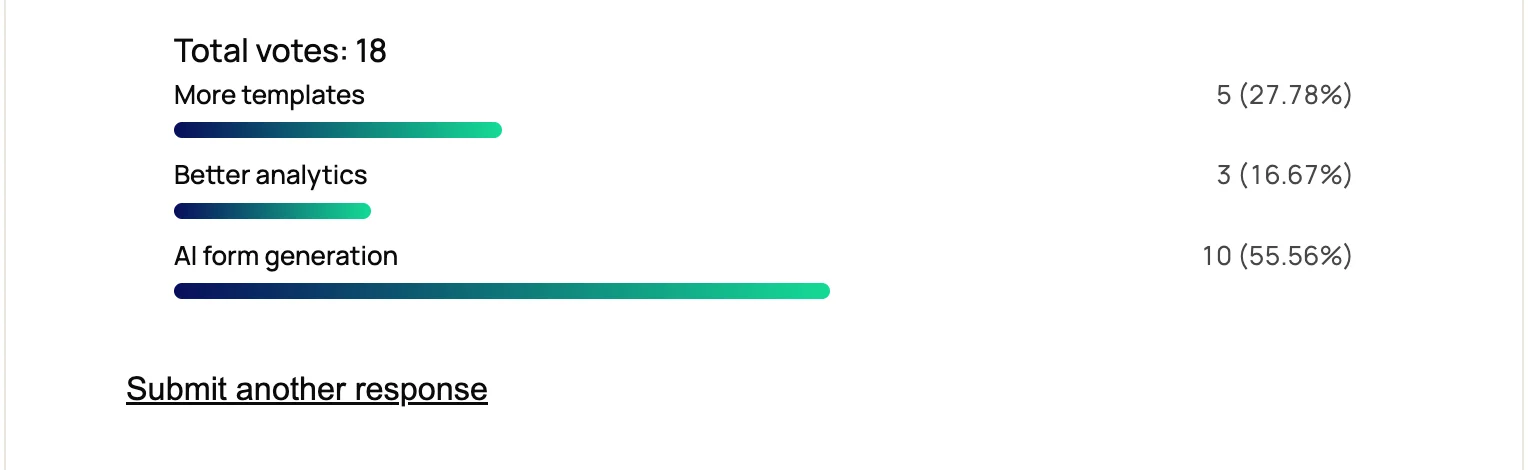
Add a Poll field, type the question and the options. Each vote picks one option.
Random order
Switch on Randomize options so the order of the list does not favor one answer.
Poll Form template
Start from the built-in Poll Form template, a single-question poll ready to edit and publish.
Results
Show results your way
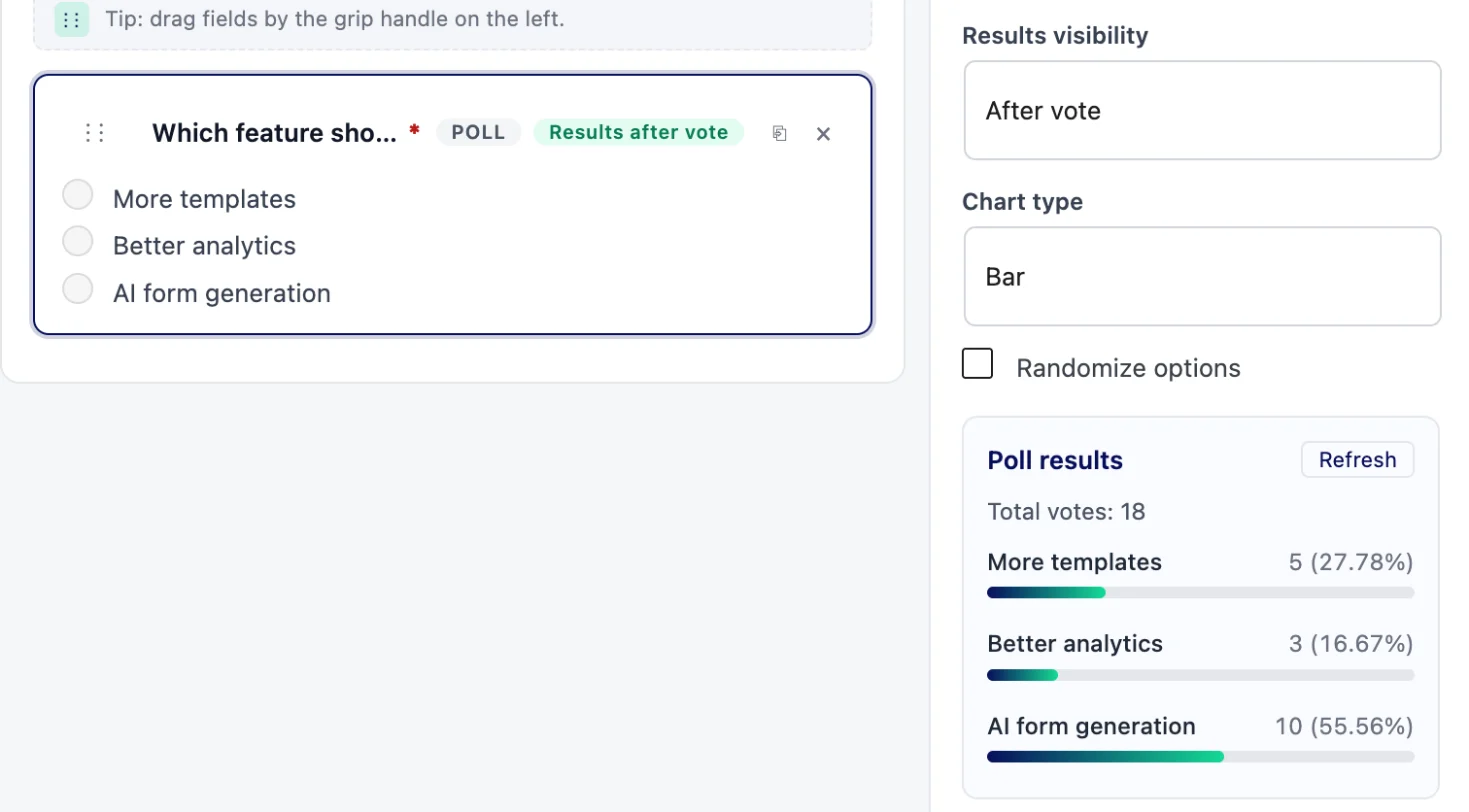
Two settings on the Poll field decide what voters see: when the results appear and how the chart looks.
- After vote (the default): the chart appears once the visitor has voted
- Always: the current totals show with the poll, before anyone votes
- Never: votes are collected and the results stay in your admin
- Chart type: bar or percentage
Display
Place it anywhere
Put the poll in a post, a sidebar or a landing page. Building in Divi 5? See the form module for Divi 5.
- The Poll block in the block editor, next to the Form, Multi-step and Quiz blocks
- The shortcode
This form is currently unavailable. Please try again later.
- The Neural Poll module for Divi 5, on Starter and Agency (Divi 5 only, not Divi 4)
Divi is a registered trademark of Elegant Themes, Inc. This website is not affiliated with nor endorsed by Elegant Themes.
Totals
See the totals
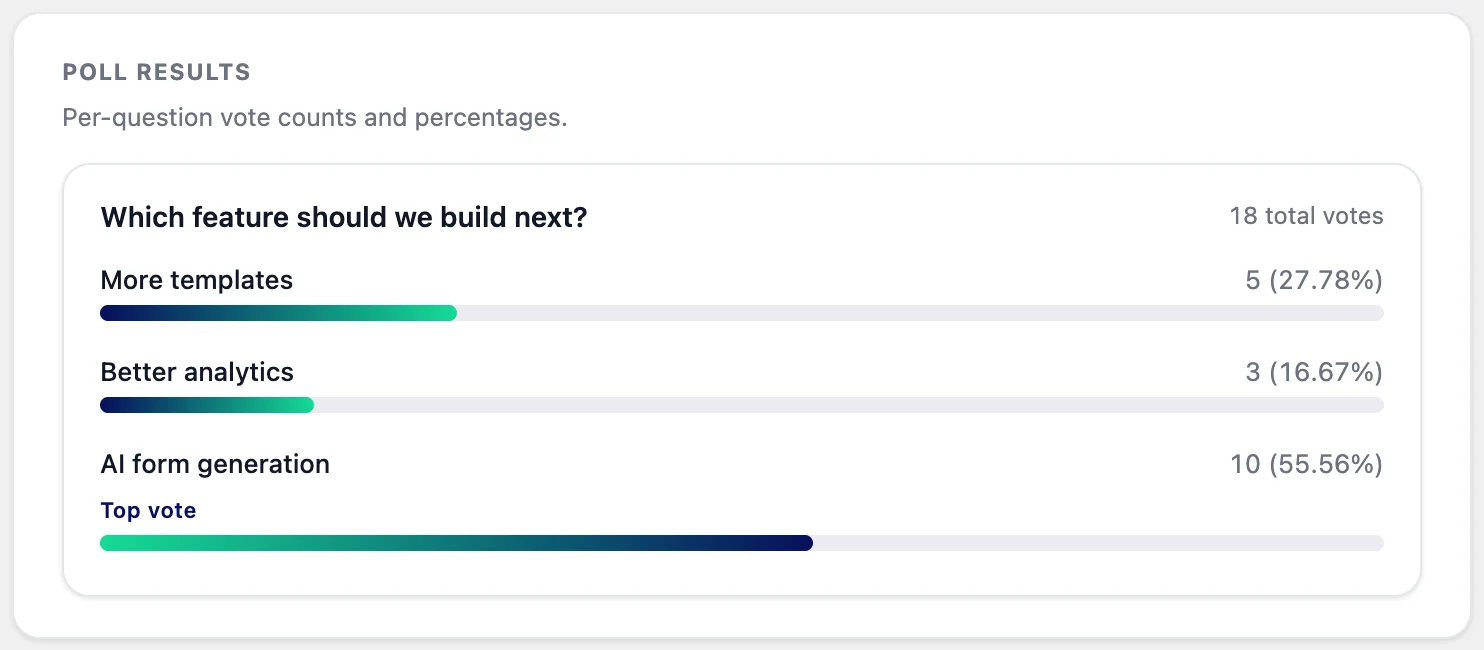
Neural Forms > Analytics has a results screen for each poll form, with a chart per question.
- Total entries and total poll votes for the form
- One card per poll question, with the votes and percentage for each option
- The leading option is labelled Top vote
- The same totals in the poll field’s settings panel in the builder, with a Refresh button
Spam
Keep spam out of the vote
Polls use the same spam protection as every Neural Forms form, in every plan.
- A hidden honeypot field catches bots that fill it in
- Each IP address can send 10 submissions per form every 10 minutes
- Cloudflare Turnstile or Google reCAPTCHA v2, switched on per form
- There is no one-vote-per-person lock based on cookies or logins; the rate limit is the guard against repeat votes
Plans
Vote limits by plan
Everything a poll needs is in the free Lite plugin. The paid plans remove the vote cap.
| Lite (free) | Starter and Agency | |
|---|---|---|
| Votes per poll form | Up to 200 (spam counts, trash does not) | No cap |
| Poll field, results after vote, always or never, bar or percentage chart | Yes | Yes |
| Poll block and shortcode | Yes | Yes |
| Results screen with per-question charts | Yes | Yes |
| Neural Poll module for Divi 5 | No | Yes |
| Price | Free | Starter $99/year, Agency $199/year, unlimited sites |
The 200 cap applies to poll and quiz forms only; contact, survey and multi-step forms have no entry limit on any plan. Running a scored quiz instead? See the quiz form, or the survey form for longer questionnaires.
FAQs
Frequently asked questions about polls
How do I add a poll to a WordPress page?
Create a form from the Poll Form template, or add a Poll field to a form, type your options and save. Then place it with the Poll block in the block editor or with the
This form is currently unavailable. Please try again later.
Can visitors see the results after they vote?
Yes. After vote is the default: the chart appears once the vote is in. You can also show the results always or never, as a bar or a percentage chart.
How many votes can a poll take on the free plan?
Lite accepts up to 200 entries per poll form. Spam entries count toward the 200 and entries in the trash do not. Starter ($99/year) and Agency ($199/year) remove the cap.
Can a poll allow more than one answer?
No. Each vote picks one option. For a question where people can pick several answers, use a Checkboxes field in a survey form instead.
Can I stop people from voting twice?
Neural Forms limits each IP address to 10 submissions per form every 10 minutes, blocks bots with a honeypot, and can add Turnstile or reCAPTCHA v2. It does not lock a poll to one vote per person with cookies or logins.
Can I add a poll in Divi 5?
Yes, on Starter and Agency. The Neural Poll module adds a poll form to a Divi 5 layout. The Divi modules load on Divi 5 only, not on Divi 4.
Neural Forms
Ask your visitors and show them the answer
Polls are free up to 200 votes per poll form. Starter ($99/year) and Agency ($199/year) remove the cap and add the Neural Poll module for Divi 5, on unlimited sites.
Free on WordPress.orgUnlimited sitesNo credit card