Google Forms integration
Import any Google Form into WordPress in one click
Bring your existing Google Forms into WordPress without rebuilding them. Every question type is auto-converted to a native Neural Forms block. Edit, style, embed, and extend with AI analysis, all inside the WordPress block editor.
The Google Forms import is included in Neural Forms Pro (Starter $99/year and Agency $199/year) and covers unlimited sites.
Features
Every Google Forms question type is supported
Text fields
Short answer questions become Text Field blocks. Long answer questions become Textarea blocks. Placeholder text, character limits, and validation hints are preserved during import.
Choice fields
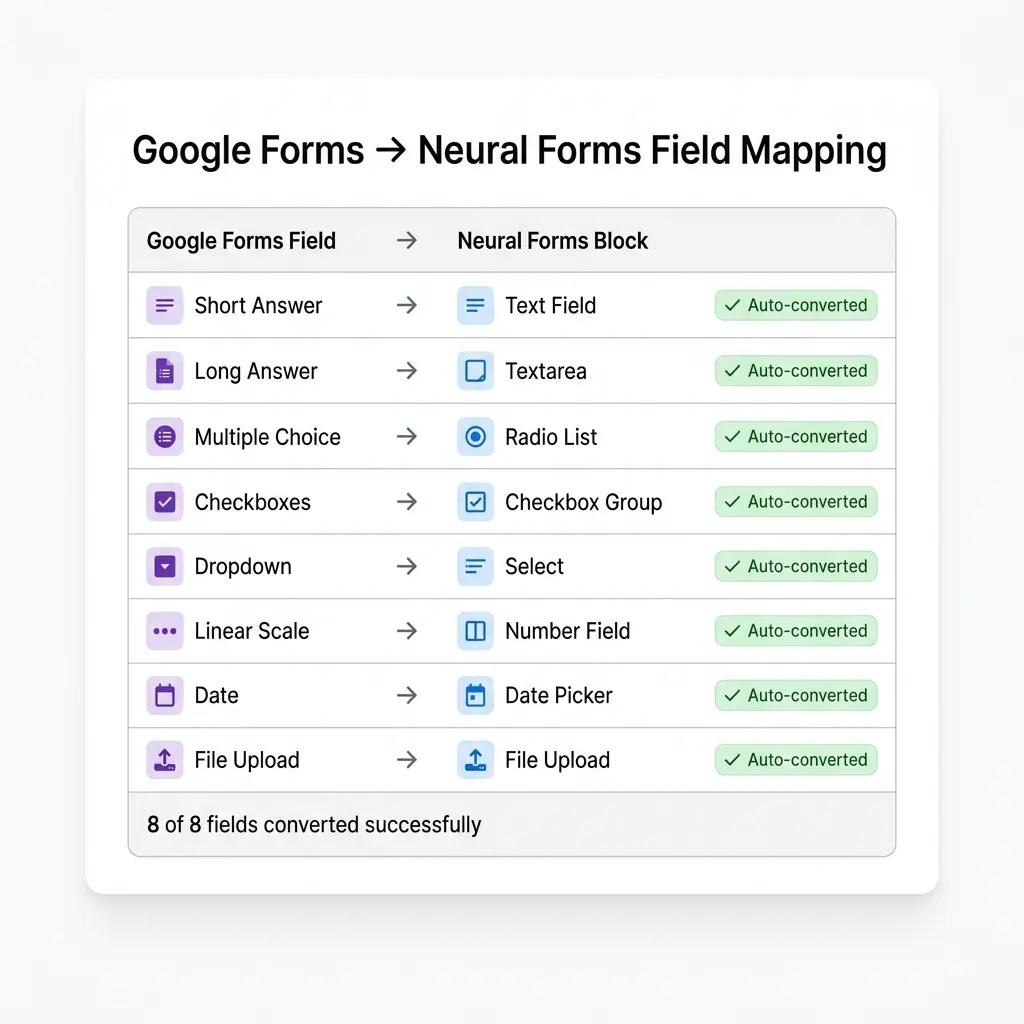
Multiple choice becomes a Radio block. Checkboxes become a Checkboxes block. Dropdown becomes a Select block. All options, “Other” entries, and default selections transfer cleanly.
Date and time
Google Forms date questions become Date blocks with the original format preserved. Time questions become Text fields with time validation. Year-only and date-range formats are converted automatically.
File uploads
Google Forms file upload questions convert to Neural Forms File Upload blocks. File type restrictions, max size limits, and max file count settings are preserved.
Linear scales
Rating scales (1 to 5, 1 to 10) become Range fields with min and max constraints, or Radio groups with the original scale labels preserved. You choose which during the import preview.
Sections and pages
Multi-page Google Forms are imported as multi-step Neural Forms with each section becoming a dedicated step. Section titles become step headings, descriptions become step intros.
Required field preservation
Required questions in Google Forms become required fields in Neural Forms. Optional fields stay optional. Required state, validation rules, and error messages all transfer.
Quiz mode support
Google Forms quizzes import with answer keys, point values, and correct answer indicators preserved. Use the Quiz field to recreate scored quizzes with results tracking.
How It Works
From Google Form to WordPress in 3 steps
No manual rebuilding. No field-by-field copying. Paste your Google Form URL and Neural Forms reads the structure automatically.
1
Paste your Google Form URL
Go to Neural Forms > Import > Google Forms. Paste any public Google Form URL. Neural Forms reads the form schema directly from Google. No API key needed for public forms. For private forms, connect your Google account with one-click OAuth.
2
Review the auto-conversion
Every Google Forms question type is mapped to its Neural Forms equivalent automatically. Short answer to Text, Multiple choice to Radio, Checkboxes to Checkboxes, Dropdown to Select, and so on. Review the field-by-field mapping, adjust if needed, and click Import.
3
Edit, style, and publish
Your imported form opens in the block editor with all fields ready. Add WordPress-native styling, rearrange blocks, enable AI analysis, configure integrations to HubSpot, Mailchimp, Zapier, or WhatsApp, and publish anywhere on your WordPress site using the Gutenberg block, shortcode, or Divi 5 module.
Why teams import Google Forms into WordPress
Reasons to bring your Google Forms into WordPress
Google Forms is a useful tool for many use cases. Teams move their forms into WordPress when they need capabilities Google Forms does not currently offer or when they want their form data and design system inside WordPress.
Custom design and branding control
Google Forms uses the Google design system and Google branding. Once in Neural Forms, your forms inherit your WordPress theme, your fonts, your colors, your spacing. Full control over every visual aspect, including 150+ styling attributes in the Gutenberg block.
AI analysis on every submission
Neural Forms analyzes each submission with AI to generate a summary, assign a category, calculate a priority score, and detect spam. The auto-drafted reply is ready to send from the lead inbox. Google Forms does not include AI analysis natively.
Native CRM and email integrations
Push submissions directly to HubSpot, Mailchimp, Zapier, and WhatsApp from inside the form builder. No add-on installation, no external connector configuration. Five integrations come with the Pro license.
Forms render on your domain
Neural Forms blocks render as part of your WordPress page on your domain. Visitors stay on your site through submission. No iframe embed, no redirect to a Google-hosted page.
Multi-step forms with conditional logic
Build multi-step forms with progress indicators, per-step validation, and conditional field visibility based on prior answers. Configurable inside the form builder, with each step having its own title, description, and field group.
Data stored in your WordPress database
Form submissions are stored in your WordPress database, under your control. Export to CSV with date filtering, access via REST API, query with WordPress’s database tools. Combined with Privacy Mode to skip IP and user-agent storage, you have GDPR-friendly data handling on your own server.
Combine with Neural Forms Pro features
Once imported, your former Google Forms gain access to all Pro features: AI form generation, smart spam detection with adjustable threshold, the site profile scraper, polish and refine drafts, premium AI tiers, the Divi 5 module, Matrix and Repeater fields, and priority support.
One-click import
Browse, search, and import any Google Form
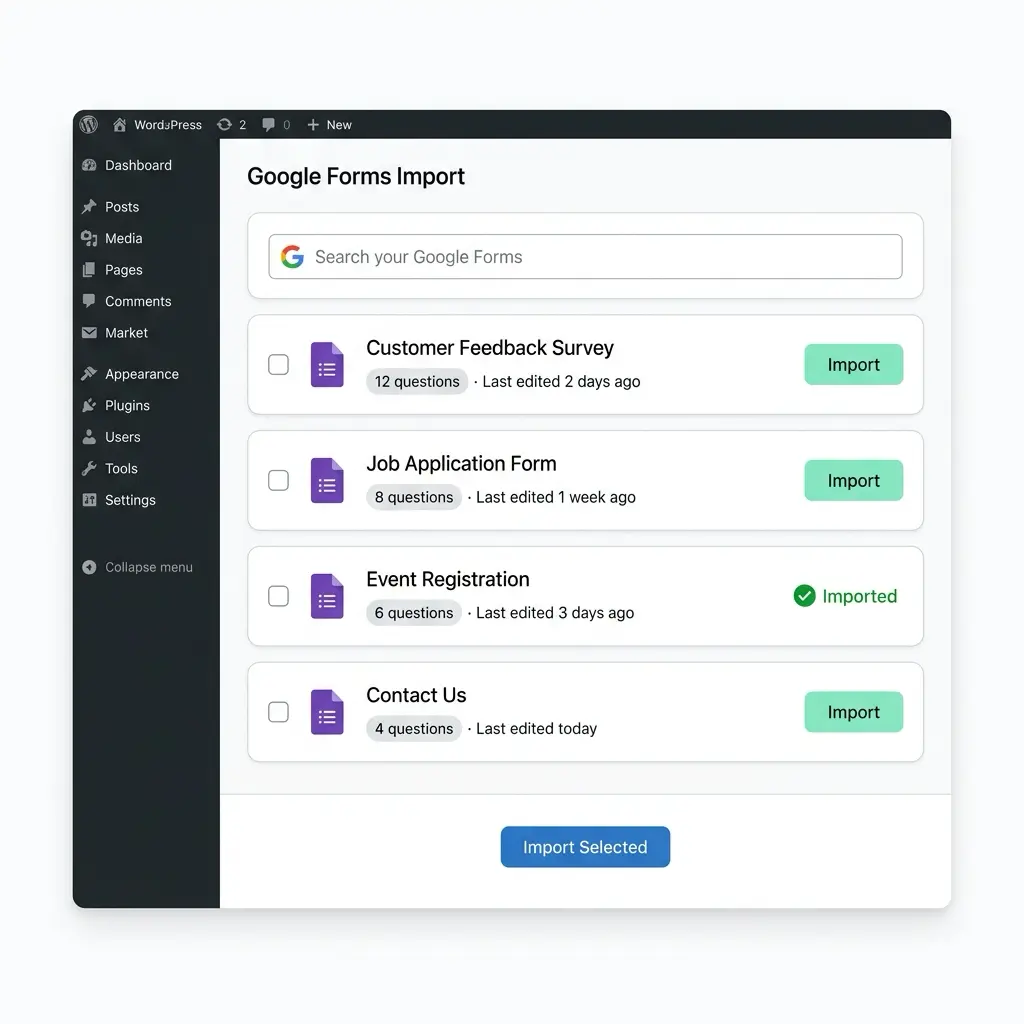
The import interface lists Google Forms from your connected Google account with question counts, last-edited dates, and import status. Search by name, select the forms you want, and import them individually or in bulk. You can also import any public Google Form by URL without connecting your account.
Field conversion
Every question type maps to a native Neural Forms block
Neural Forms understands each Google Forms question type and converts it to the semantically correct Neural Forms block. Options, validation rules, required state, descriptions, and helper text are all preserved during import.
AI and Google Forms
Imported forms gain AI analysis on every submission
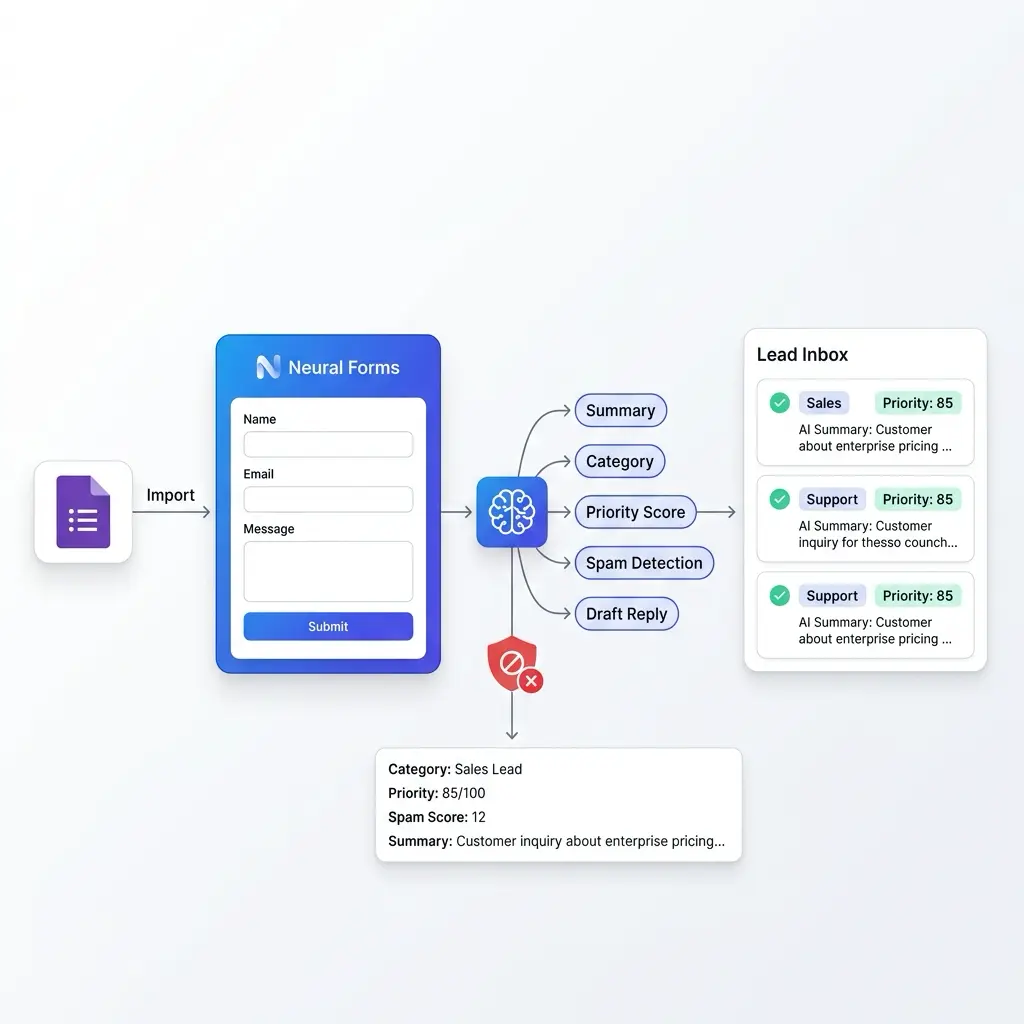
Once a Google Form is imported into Neural Forms, every submission to the new Neural Forms version is automatically analyzed by AI. The AI generates a summary, assigns a category, calculates a priority score, and detects spam. AI metadata is stored on each entry inside the lead inbox.
AI features are included on all paid plans. Starter ($99/year) includes 7,500 AI credits per year. Agency ($199/year) includes 25,000. One credit processes one form submission.
Use Cases
Teams that import Google Forms into WordPress
If you’ve been using Google Forms because it’s free and easy, here’s why teams switch to Neural Forms.
Marketing teams
Import lead capture forms from Google Forms into your WordPress landing pages. Add HubSpot sync to push leads to your CRM, custom branding to match your site, and AI spam filtering to keep your inbox clean. Marketing automation becomes possible in ways the original Google Forms could not support.
Education and schools
Move student enrollment, parent consent, course feedback, and event signup forms from Google Forms into the school WordPress site. Use multi-step layouts for long applications, file uploads for documents, and AI analysis to triage incoming inquiries by category.
Healthcare providers
Patient intake forms, appointment requests, and health questionnaires move from Google Forms into the practice WordPress site. Combined with Privacy Mode, IP and user-agent data is not stored. Submission data lives in the WordPress database, under your control, with full audit and export capabilities.
E-commerce stores
Quote request forms, custom order forms, and product inquiry forms become beautifully styled, on-brand forms inside the WooCommerce site. Add Repeater fields for multiple items, File Upload for design specifications, and HubSpot or Mailchimp integration for lead routing.
Event organizers
RSVP and registration forms move from Google Forms into the event WordPress site. Multi-step flows handle complex registrations, conditional logic shows meal selection only to in-person attendees, WhatsApp notifications alert the organizing team, and AI helps prioritize VIP registrations.
HR and recruitment
Job application forms move from Google Forms into the company careers page. Resume File Upload, Repeater fields for work experience, AI analysis to flag strong candidates, and direct sync to HubSpot or your ATS via Zapier. Recruiters move faster on high-priority applications.
Agencies managing client forms
Agencies importing Google Forms from multiple clients consolidate everything inside one WordPress dashboard. Per-client form management, per-form integrations, white-label rendering on each client’s domain, and a unified lead inbox for all client form submissions.
FAQs
Frequently asked questions about Google Forms import
For public Google Forms, no API key is required. Just paste the form URL. For private or restricted Google Forms, you connect your Google account using one-click OAuth. The OAuth scope is read-only access to your Google Forms.
All of them: Short answer, Long answer, Multiple choice, Checkboxes, Dropdown, Linear scale, Date, Time, File upload, and Multi-page sections. Quiz mode questions with answer keys and point values are also supported. Each is mapped to its Neural Forms block equivalent during import.
Yes. Re-importing updates the field structure while preserving any custom styling, integrations, and AI configuration you have added in Neural Forms. A diff view shows what changed before you confirm the re-import.
The importer brings over the form structure (fields, options, validation, sections) but not existing response data. New submissions through the Neural Forms version of the form are stored in your WordPress database. Existing Google Forms responses remain in Google Forms.
Yes. Importing creates a separate Neural Forms version of the form. Your original Google Form stays untouched and continues to collect responses independently. Many teams run both during a transition period before fully moving to Neural Forms.
No. Google Forms import is a Pro feature included in Starter ($99/year) and Agency ($199/year). The free Lite version includes the full Neural Forms builder, all 18 free field types, the lead inbox, Gutenberg block, and 100 free AI credits on signup.
When a Google Form has file upload questions, the imported Neural Forms version uses Neural Forms File Upload. New submissions store files in your WordPress media library or a configured upload directory, not in Google Drive. Existing files from past Google Forms responses stay in the original Google Drive folder.
Yes. Neural Forms uses the standard WordPress block editor and inherits your theme’s typography, colors, and spacing by default. Override the defaults using the 150+ styling attributes in the Gutenberg block for full design control per form.
Importing a single form takes one to two seconds. Bulk imports of multiple forms typically complete in under thirty seconds. Re-importing an existing form to sync changes takes one to two seconds.
URL parameters that prefill Google Form fields are converted to query string parameter mapping in Neural Forms. Field IDs change during import, so existing prefill URLs need to be updated to use the new Neural Forms field names, which are shown in the import preview.
More Integrations
Explore other Neural Forms integrations
HubSpot
Auto-map form fields to HubSpot contact properties. Sync submissions to your CRM in real time.
Mailchimp
Sync form respondents to Mailchimp audiences with merge tag mapping and tag-based segmentation.
Zapier
Trigger any of 6,000+ app workflows on form submission. Connect to Slack, Notion, Airtable, and more.
Send WhatsApp notifications to up to 10 recipients via the WhatsApp Business API.
Neural Forms
Ready to import your Google Forms into WordPress?
Get Neural Forms Pro to import any Google Form into WordPress and unlock four more native integrations: HubSpot, Mailchimp, Zapier, and WhatsApp. Both Starter ($99/year) and Agency ($199/year) include all features and cover unlimited sites.
30-Day Money Back Guarantee. No Questions Asked!