Mailchimp Integration
Grow your Mailchimp audience with every form submission on your WordPress website
Map Neural Forms fields to Mailchimp merge tags and every form submission adds a new subscriber to your chosen audience with field data, tags, and double opt-in compliance. No CSV imports, no manual exports, no separate connector plugin to maintain.
The Mailchimp integration is included in Neural Forms Pro (Starter $99/year and Agency $199/year) and covers unlimited sites.
Features
Everything you need to sync forms with Mailchimp
Visual field mapping
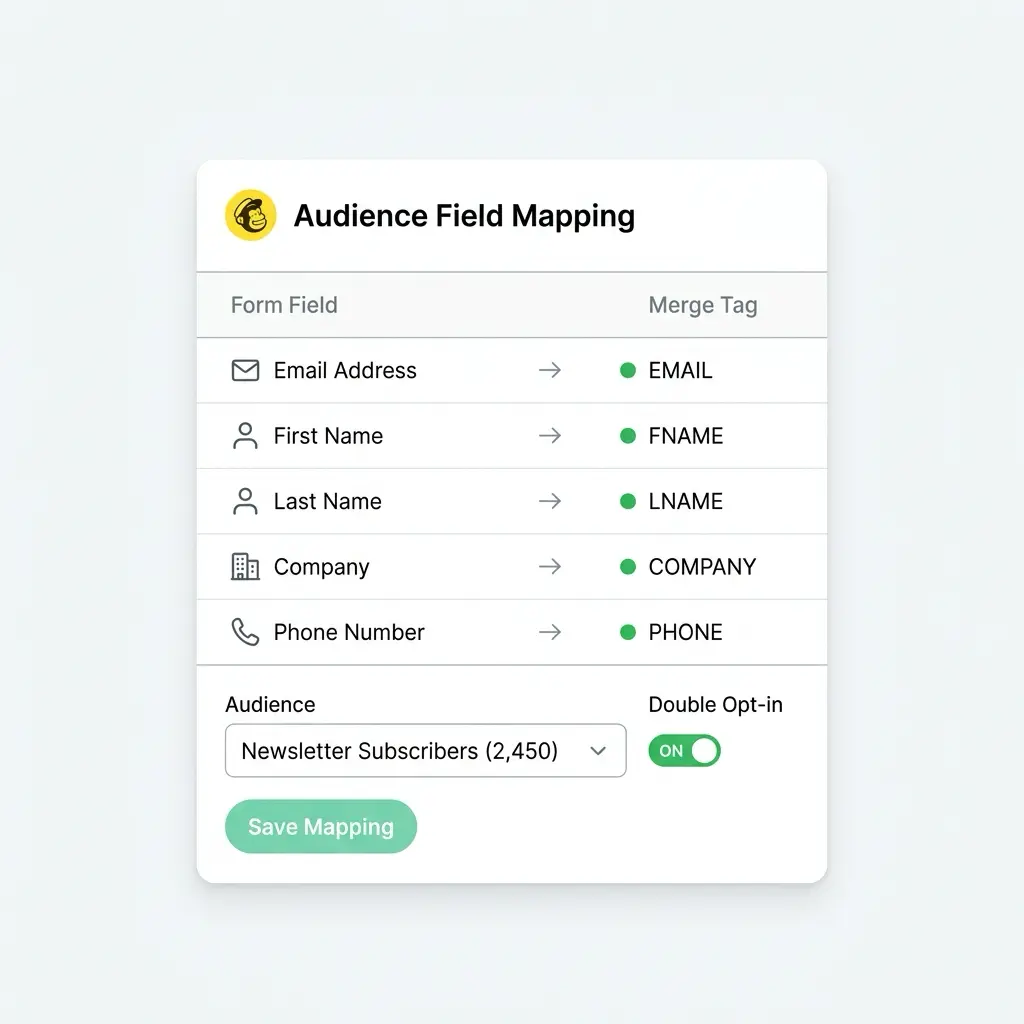
Map any form field to any Mailchimp merge tag in a drag-and-drop interface. The mapping panel shows all merge tags from your selected audience with type indicators (text, email, number, address, date) and auto-match suggestions based on field labels.
Audience selection per form
Choose which Mailchimp audience receives subscribers from each form. Different forms can push to different audiences. Newsletter signups go to one audience, product updates to another, event registrants to a third.
Auto-tagging by form data
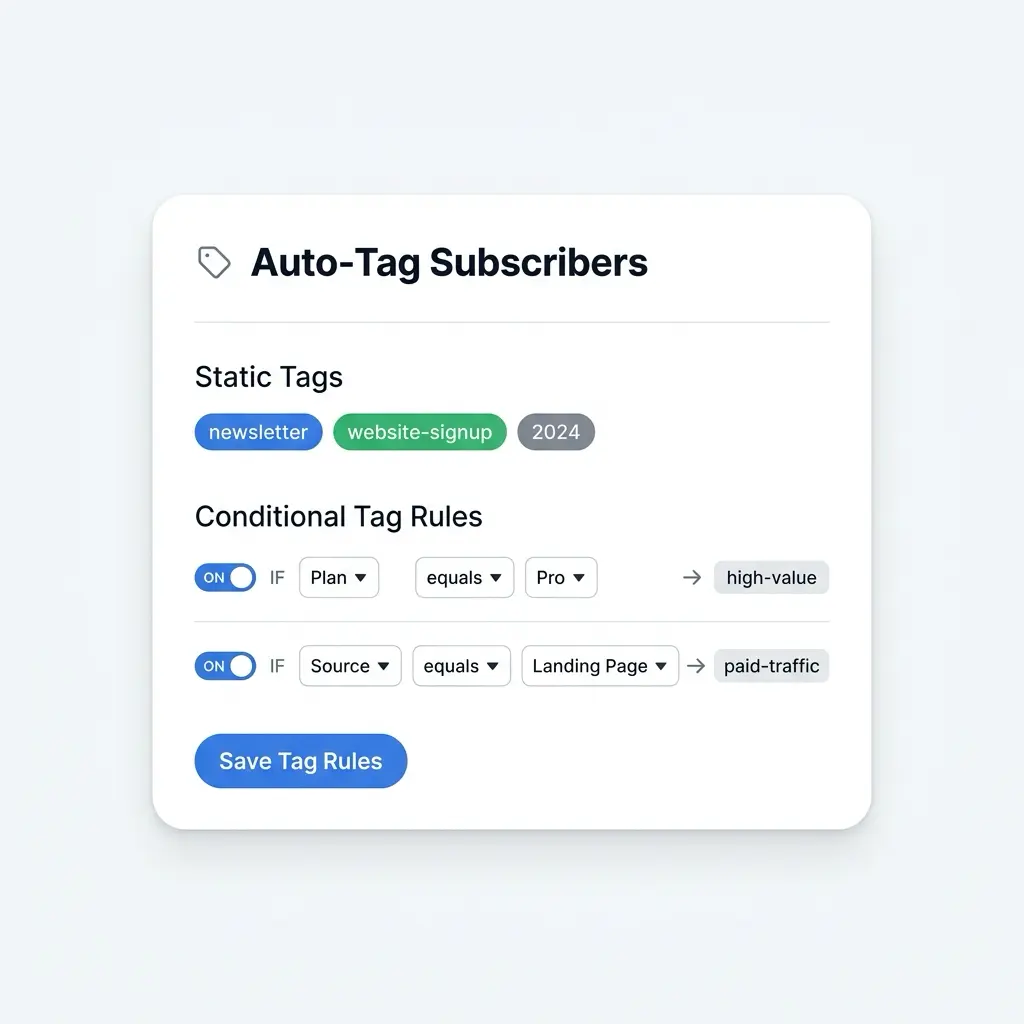
Automatically assign Mailchimp tags to new subscribers based on form data. Tag by source page, form name, dropdown selection, or any field value. Build segmented lists from the moment subscribers join.
Double opt-in support
Enable or disable double opt-in per form. When enabled, Mailchimp sends a confirmation email before adding the subscriber to your audience. GDPR-compliant by design, configurable per use case.
Create or update subscribers
If a subscriber already exists in your audience, Neural Forms updates their merge tag data instead of creating a duplicate. Existing tags are preserved. New tags are appended without overwriting historical data.
Per-entry sync status
Every submission shows its Mailchimp sync status in the entry detail view. See whether the subscriber was added, updated, or if the sync failed, with the exact error message for debugging.
Custom merge tag support
Map form fields to custom merge tags you have created in Mailchimp, not just the defaults (FNAME, LNAME, EMAIL, PHONE, ADDRESS). Any custom merge tag in your audience schema appears in the mapping panel.
Works with Mailchimp Free, Essentials, Standard, and Premium
Neural Forms uses the standard Mailchimp Marketing API, available on all Mailchimp tiers. No Mailchimp subscription upgrade required to use the integration.
How It Works
Connect forms in WordPress to Mailchimp in under 2 minutes
No developer needed. Your Mailchimp API key and a few clicks inside the Neural Forms settings.
1
Add your Mailchimp API key
In your Mailchimp account, go to Account and Billing > Extras > API Keys and generate a new key. In WordPress, go to Neural Forms > Settings > Integrations, paste the API key, and click Test Connection. Neural Forms pulls in your audiences, merge tags, and tag list in real time.
2
Map your form fields
Open any form, go to the Integrations tab, enable Mailchimp, and select an audience. Auto-mapping matches form fields to merge tags by label and type. Email maps to EMAIL, first name maps to FNAME, phone maps to PHONE. Review the auto-mapped fields, adjust if needed, configure double opt-in and tags, then save.
3
Publish and grow your list
Embed your form using the Gutenberg block, shortcode, or Divi 5 module. Every submission adds a subscriber to your Mailchimp audience in real time. The sync status appears on each entry in the lead inbox, so you know exactly when the subscriber was added and what tags were applied.
Use Cases
How teams use Neural Forms with Mailchimp
Newsletter signups
Embed a simple email capture form on your blog, homepage, or footer. Every submission adds the subscriber to your Mailchimp newsletter audience with name, email, and auto-tags based on the signup source page. Build a clean, attributable list from day one.
Lead magnets and gated content
Build a form that gates a PDF, video, ebook, or webinar registration. When users submit, they are added to a Mailchimp audience tagged with the resource name (whitepaper-ai-trends, ebook-pricing-guide). Trigger Mailchimp automations to send the asset and start nurture sequences.
Event registration
Create multi-step registration forms collecting attendee details, session preferences, and dietary needs. All data syncs to Mailchimp with custom merge tags for the event. Your event team sends reminders, schedule updates, and post-event surveys directly from Mailchimp.
Product interest surveys
Run a survey asking about product preferences, pricing sensitivity, or feature requests. Tag respondents by interest area (interested-pro, interested-enterprise, price-sensitive). Your marketing team sends personalized product launch emails to each segment from Mailchimp.
Contact forms with list building
Turn your standard contact form into a list builder. Add an opt-in checkbox: when checked, the respondent is added to your Mailchimp audience along with their inquiry details stored as merge tag data. Honor GDPR consent by tying the subscriber addition to an explicit checkbox.
Course and webinar signups
Build enrollment forms for online courses, masterclasses, or webinars. Subscribers are tagged by course name and enrollment date, enabling automated drip campaigns, reminder sequences, and replay links in Mailchimp.
Field Mapping
Map form fields to Mailchimp merge tags visually
The Integrations tab inside the form builder shows every Neural Forms field on the left and every Mailchimp merge tag on the right. Drag a form field to a merge tag, or let auto-mapping match them by label and type. Select your audience, configure double opt-in, and save.
Smart Tagging
Auto-tag subscribers based on form data for instant segmentation
Assign Mailchimp tags automatically based on what users submit. Build conditional rules that tag subscribers by plan type, interest area, source page, or any field value. Segment your audience from day one without manual exports or rule building inside Mailchimp.
AI and Mailchimp
Every subscriber is enriched by AI before joining your audience
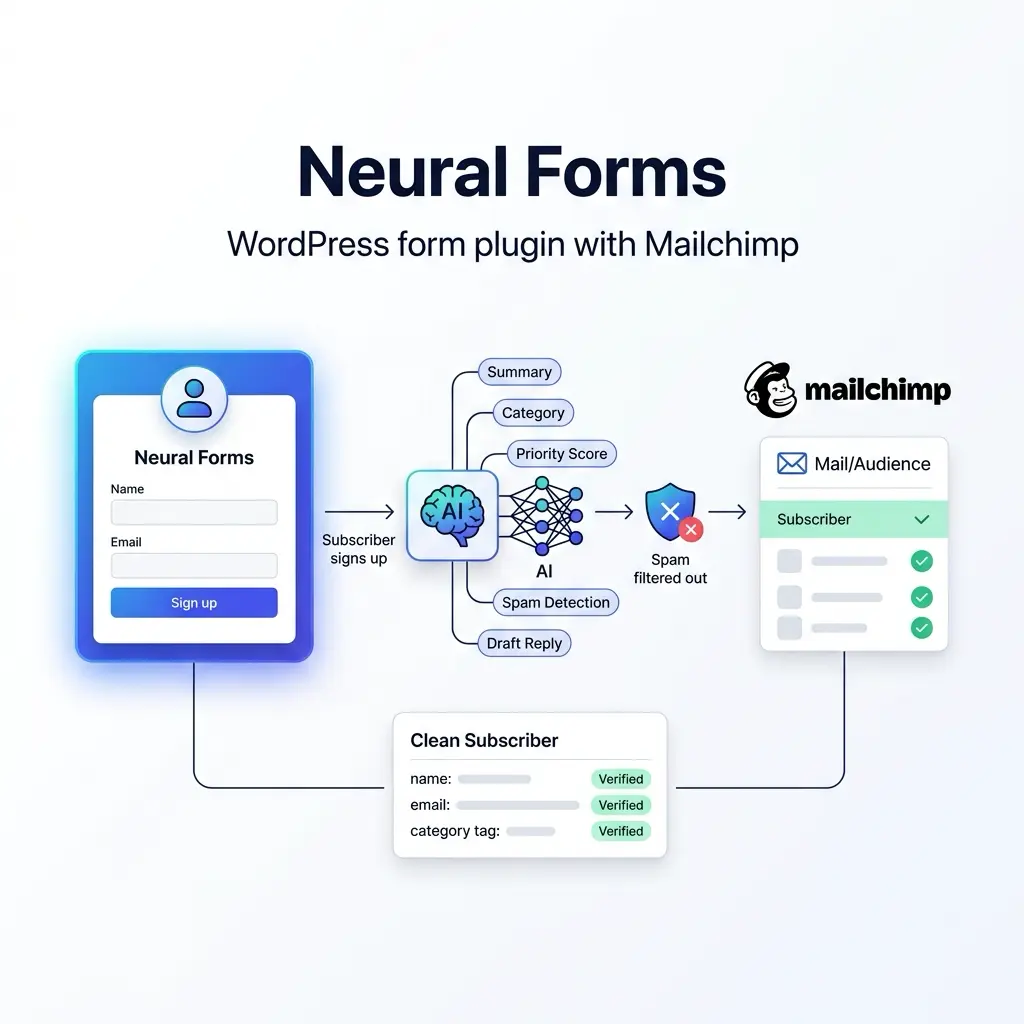
Before a subscriber syncs to Mailchimp, Neural Forms has already analyzed the submission. The AI generates a summary, assigns a category, calculates a priority score, and detects spam. Pre-qualified, deduplicated, and clean subscribers land in your audience, with AI metadata stored on the entry inside Neural Forms.
AI features are included on all paid plans. Starter ($99/year) includes 7,500 AI credits per year. Agency ($199/year) includes 25,000. One credit processes one form submission.
FAQs
Frequently asked questions about the Mailchimp integration
Log in to Mailchimp, click your profile, go to Account and Billing > Extras > API Keys. Generate a new key or copy an existing one. Paste it in Neural Forms > Settings > Integrations > Mailchimp and click Test Connection to verify it works.
Yes. Each form has its own integration settings. Form A can push to your Newsletter audience while Form B pushes to your Product Updates audience. Mapping, tags, and double opt-in are configured independently per form.
Neural Forms updates their existing merge tag data and appends any new tags. It does not create a duplicate subscriber. If double opt-in is enabled, existing subscribers are updated without re-triggering the confirmation email.
Audience selection, merge tag mapping, and tag assignment are fully supported. For Mailchimp interest groups, use tags as a more flexible alternative. Tags can be added or removed without restrictions and used for any segmentation pattern that interest groups support.
No. Double opt-in is a per-form toggle. Enable it for GDPR-regulated audiences and disable it for internal forms, transactional confirmations, or workflows where opt-in has already been collected. The setting lives in Neural Forms, not in Mailchimp.
Yes. Neural Forms supports multiple integrations per form. A single submission can push data to Mailchimp, HubSpot, WhatsApp, and Zapier simultaneously. Each integration has its own field mapping, audience or property selection, and sync status.
Yes. Neural Forms uses the standard Mailchimp Marketing API which is available on the free plan. Mailchimp’s free plan supports up to 500 contacts. Larger audiences require a paid Mailchimp plan, billed by Mailchimp not by us.
If the API key becomes invalid, syncs start failing and the failure is logged on each entry with the error message. Regenerate the key in Mailchimp, paste the new key in Neural Forms Settings, click Test Connection, and the integration resumes. Failed syncs from the downtime window can be retried manually from the entry detail page.
Mailchimp sends welcome emails based on your audience settings inside Mailchimp, not Neural Forms. If you have a welcome automation configured in Mailchimp, it triggers when Neural Forms adds the subscriber. Double opt-in confirmation emails (when enabled) are sent by Mailchimp.
Yes. Mailchimp requires the email field at minimum. All other merge tags are optional unless your Mailchimp audience configuration requires them. Required fields not mapped to form fields are flagged with warnings before you save the integration.
More Integrations
Explore other Neural Forms integrations
HubSpot
Auto-map form fields to HubSpot contact properties. Sync submissions to your CRM in real time.
Google Forms
Import Google Forms into Neural Forms with one click. Migration tool plus optional metadata linking.
Zapier
Trigger any of 6,000+ app workflows on form submission. Connect to Slack, Notion, Airtable, and more.
Send WhatsApp notifications to up to 10 recipients via the WhatsApp Business API.
Neural Forms
Ready to turn every WordPress form into a list builder?
Get Neural Forms Pro to unlock the Mailchimp integration along with HubSpot, Zapier, WhatsApp, and Google Forms. Both Starter ($99/year) and Agency ($199/year) include all five native integrations and cover unlimited sites.
30-Day Money Back Guarantee. No Questions Asked!