
WhatsApp Integration
Send WordPress form notifications to your team on WhatsApp
Notify your team on WhatsApp the moment a form is submitted. Send structured messages with respondent name, email, message excerpt, and a direct entry link to up to 10 recipients at the same time. Built on the official WhatsApp Business API for reliable, compliant delivery.
The WhatsApp integration is included in Neural Forms Pro (Starter $99/year and Agency $199/year) and covers unlimited sites. WhatsApp Business API access (via Twilio, MessageBird, or Meta Cloud API) is required and billed separately by your provider.
Features
Everything you need to send WordPress form alerts to WhatsApp
Up to 10 recipients per form
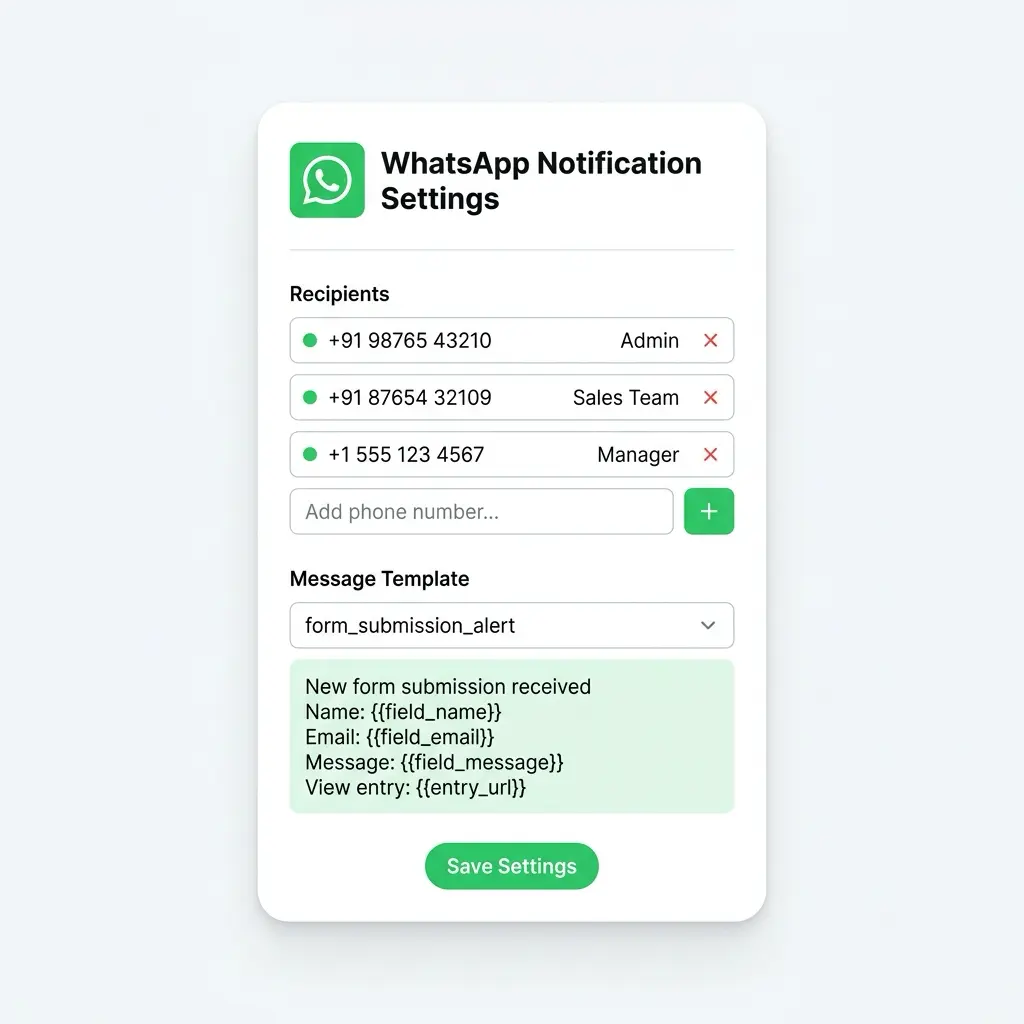
Add up to 10 WhatsApp phone numbers per form. Each recipient receives the same formatted alert in real time. Label recipients for easy management (Admin, Sales, Support, Manager) and update or remove them anytime without touching the form.
Approved WhatsApp Business templates
Messages are sent using WhatsApp Business API approved templates. This ensures reliable delivery and compliance with WhatsApp’s policies, with no risk of account suspension. Templates support dynamic field placeholders for personalized content.
Dynamic field placeholders
Insert any form field value into your WhatsApp message using placeholders like {{field_name}}, {{field_email}}, {{field_message}}. Each message is personalized with the actual submission data, formatted for easy reading on mobile.
Real-time delivery
Messages are sent the moment a form is submitted. No polling, no cron delays, no batching. Your team sees the alert on WhatsApp within seconds, ready to respond on the channel they already use throughout the day.
End-to-end encrypted via WhatsApp
WhatsApp Business API messages are end-to-end encrypted by WhatsApp. Form data travels securely from your WordPress server through your WhatsApp Business API provider to the recipient’s device, with WhatsApp’s encryption applied to the final delivery.
Per-entry delivery status
Every submission shows its WhatsApp delivery status in the entry detail view: Sent, Delivered, Read, or Failed. View the exact API response code and error message for failed deliveries, and retry from the same screen.
Per-form recipient configuration
Configure different recipient lists for different forms. Your contact form notifies the sales team, your support form notifies the support team, your job application form notifies HR. One plugin, many notification flows.
Works with Twilio, MessageBird, and Meta Cloud API
Neural Forms uses the standard WhatsApp Business API and works with any approved Business Solution Provider (BSP). Twilio, MessageBird, and Meta’s official Cloud API are all supported. Choose the provider that fits your scale and pricing needs.
How It Works
Connect WhatsApp notifications in under 3 minutes
No developer needed. Connect your WhatsApp Business API credentials, add recipients, pick a template, and every submission sends an alert.
1
Connect your WhatsApp Business API credentials
In your WhatsApp Business API provider dashboard (Twilio, MessageBird, or Meta Cloud API), copy your API credentials. In WordPress, go to Neural Forms > Settings > Integrations > WhatsApp, paste the credentials, and click Test Connection. Neural Forms verifies the credentials and pulls in your approved message templates.
2
Add recipients and pick a template
Open any form, go to the Integrations tab, and enable WhatsApp. Add up to 10 recipient phone numbers in international format (with country code) and label them (Admin, Sales, Support). Select an approved message template, or use the default submission alert template that ships with Neural Forms.
3
Publish and start getting notified
Embed your form using the Gutenberg block, shortcode, or Divi 5 module. Every submission sends a WhatsApp message to all recipients in real time. The delivery status appears on each entry in the lead inbox, so you know exactly when each recipient received the alert.
Use Cases
How teams use Neural Forms WhatsApp notifications
Sales lead alerts
Your sales team gets a WhatsApp alert the moment a lead fills out a contact form, demo request, or quote form. They respond within minutes instead of hours, improving conversion rates on time-sensitive leads. The alert includes the AI priority score so sales can focus on high-intent leads first.
Order and quote notifications
E-commerce stores with quote request, custom order, or B2B inquiry forms notify the fulfillment or sales team in real time on WhatsApp. Order details, quantities, custom specifications, and customer info arrive in one structured message ready to action.
Appointment and booking alerts
Healthcare providers, salons, consultants, and service businesses get WhatsApp alerts when patients or clients book appointments. The alert includes the date, time, service requested, contact details, and any special requirements. Receptionists can confirm or reschedule directly from WhatsApp.
Student inquiries for education
Educational institutions receive WhatsApp notifications when prospective students submit inquiry forms. The admissions team follows up immediately via WhatsApp or phone, which is faster and higher-converting than email for student inquiries.
Support ticket alerts
Customer support teams get WhatsApp alerts for urgent support tickets. AI priority, category, and customer details are included so the right person can respond to high-priority issues without waiting for someone to check the support inbox.
Event registration tracking
Event organizers get WhatsApp alerts as registrations come in. Track sign-up velocity in real time, see attendee details, and coordinate logistics with your team on the go. Useful for managing capacity-limited events where each registration matters.
Job application notifications
HR and recruiting teams get WhatsApp alerts when candidates apply for open roles. Resume URL, role applied for, key qualifications, and contact information arrive in one message. Recruiters move faster on strong candidates before competitors reach out.
Notification setup
Add recipients, choose a template, preview, and go live
The WhatsApp integration panel inside the form builder lets you manage recipient phone numbers with labels, select an approved message template, and preview exactly what your team will receive. Dynamic placeholders like {{field_name}} are replaced with actual form data at send time.
Live Alerts
See exactly what your team receives on WhatsApp
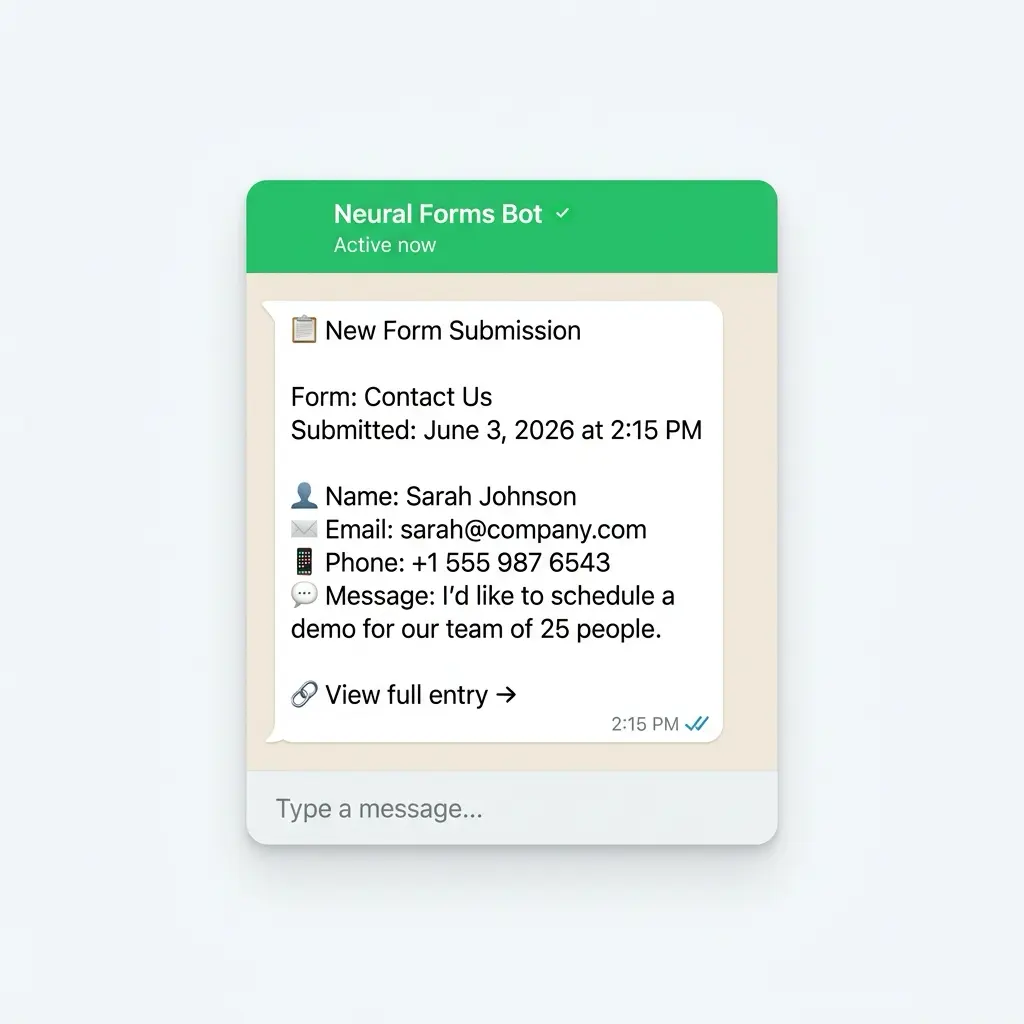
Every notification arrives as a clean, structured WhatsApp message from your Business API number. It includes the form name, submission timestamp, all mapped field values, AI summary (if AI is enabled), and a direct link to view the full entry in WordPress.
AI and WhatsApp
Every alert is pre-analyzed by AI for faster response
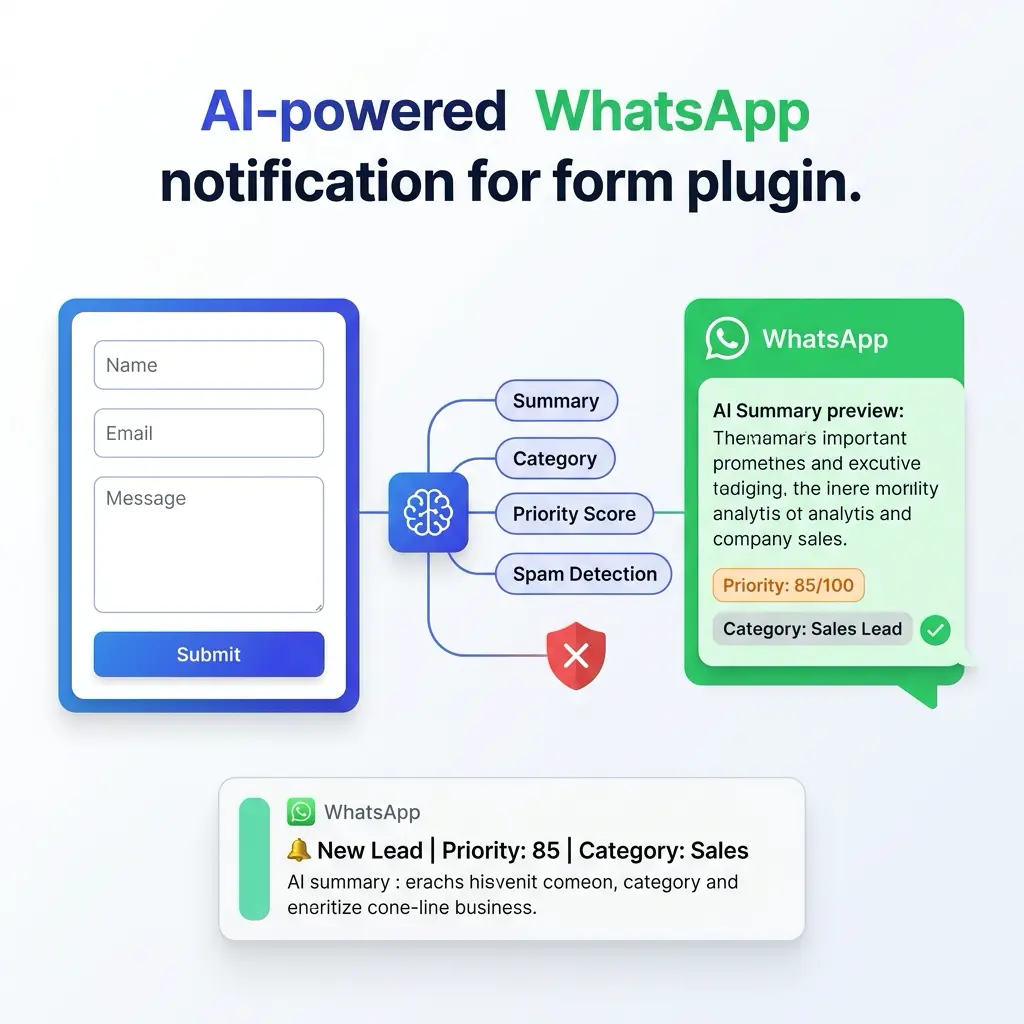
Before a WhatsApp alert is sent, Neural Forms has already analyzed the submission. The AI generates a summary, assigns a category, calculates a priority score, and detects spam. The WhatsApp message includes the AI summary and priority score, so recipients know which submissions need immediate attention before they even open the entry.
AI features are included on all paid plans. Starter ($99/year) includes 7,500 AI credits per year. Agency ($199/year) includes 25,000. One credit processes one form submission.
FAQs
Frequently asked questions about the WhatsApp integration
Yes. Neural Forms uses the official WhatsApp Business API to send messages. You need a WhatsApp Business API account through an approved Business Solution Provider like Twilio, MessageBird, 360dialog, or Meta’s Cloud API. Personal WhatsApp accounts and the WhatsApp Business app (the one from the Play Store or App Store) cannot be used. The Business API is required for compliance and reliable delivery.
Costs vary by provider and region. Meta charges per conversation (a 24-hour window where you can exchange messages with a contact), typically $0.005 to $0.10 per conversation depending on the country. Twilio and MessageBird add their own per-message or per-month fees on top. Costs are billed directly by your provider, not by Neural Forms.
The current integration is designed for team notifications. Sending messages directly to respondents requires their explicit opt-in consent and a separate WhatsApp Business conversation flow, which is more complex and on the roadmap for a future release. For now, use the autoresponder email feature in Neural Forms to send confirmation messages to respondents.
WhatsApp Business API requires pre-approved message templates for business-initiated messages (messages you send first, not in reply to a customer). Templates ensure messages are not spammy and comply with WhatsApp’s quality standards. Neural Forms includes a default submission alert template, and you can create custom templates in your API provider’s dashboard.
Meta typically approves templates within 24 hours. Some providers like Twilio offer expedited approval. The default Neural Forms template is pre-approved and ready to use, so you can start sending notifications immediately while waiting for custom template approval.
Yes. All Neural Forms integrations are independent and can be enabled at the same time. A single form submission can push data to HubSpot, add a Mailchimp subscriber, trigger a Zapier workflow, and send WhatsApp alerts to your team, all without conflict.
The form submission is still saved in your WordPress database regardless of WhatsApp delivery status. The entry detail page shows the WhatsApp API response code and the exact error message. Common issues include invalid phone numbers (wrong format or country code), expired API credentials, unapproved templates, or recipient blocks. You can resend manually from the same screen after fixing the issue.
The WhatsApp message arrives from your WhatsApp Business API number (the number you configured with your BSP), not from Neural Forms. Your recipients see your business name and number, not Neural Forms branding. This keeps the integration invisible to the recipient.
Yes, WhatsApp Business API supports media messages including images, documents, and videos. Configure your template to include media placeholders, and Neural Forms passes through file URLs from form uploads to your provider. Supported formats depend on your provider; check their documentation for limits.
International format with country code is required. Examples: +1 234 567 8900 (US), +91 98765 43210 (India), +44 20 7946 0958 (UK). Spaces and dashes are stripped automatically. Numbers without country codes will fail with a clear error message.
More Integrations
Explore other Neural Forms integrations
HubSpot
Auto-map form fields to HubSpot contact properties. Sync submissions to your CRM in real time.
Google Forms
Import Google Forms into Neural Forms with one click. Migration tool plus optional metadata linking.
Mailchimp
Sync form respondents to Mailchimp audiences with merge tag mapping and tag-based segmentation.
Zapier
Trigger any of 6,000+ app workflows on form submission. Connect to Slack, Notion, Airtable, and more.
Neural Forms
Never miss a WordPress form submission again
Get Neural Forms Pro to unlock the WhatsApp integration along with HubSpot, Mailchimp, Zapier, and Google Forms. Both Starter ($99/year) and Agency ($199/year) include all five native integrations and cover unlimited sites.
30-Day Money Back Guarantee. No Questions Asked!