
Multi-Step Forms
Break long forms into guided steps
Create multi-page forms with progress indicators, per-step validation, and a clear step-by-step experience. Keep completion rates high from the first field to the final submit.

Use Cases
Built for forms that need more than one page
Long forms kill conversions. Multi-step layouts keep users focused by showing only what matters at each stage.
Registration and applications
Break complex registration forms, job applications, or enrollment forms into logical sections. Each step collects related information (personal details, qualifications, uploads) without overwhelming the user.
Multi-page surveys
Collect detailed feedback across multiple pages with progress tracking. Respondents see how far along they are, reducing drop-off rates on longer surveys and feedback forms.
Order and booking forms
Guide customers through product configuration, delivery details, and contact information step by step. Each page validates before moving forward. No missed fields, no frustration.
How it works
From single page to multi-step in minutes
Three steps to turn any form into a guided multi-page experience.
1
Add step blocks
Drag Step layout blocks into your form to create page breaks. Each step gets its own title, description, and group of fields. Arrange them in any order.
2
Configure indicators
Choose between step numbers, a progress bar, or no indicator. Customize Previous and Next button labels from the Gutenberg block sidebar, no form edits needed.
3
Publish and collect
Embed with the Multi-Step block, shortcode, or Divi 5 module. Per-step validation ensures users complete each section before moving forward. Submissions are stored and the admin is notified, all automatic.
Multi-Step Builder
Everything you need to build multi-step forms
Step layout blocks
Drag Step blocks into any form to create page breaks. Each step gets its own title, description, and group of fields. Unlimited steps per form, fully reorderable.
Progress indicators
Choose between step numbers, a progress bar, or no indicator. Configurable per embed placement from the Gutenberg block sidebar without editing the form itself.
Previous and Next navigation
Customize Previous and Next button labels per placement. Users navigate freely between completed steps without losing any entered data. Everything stays saved.
Per-step validation
Each step validates required fields and format rules before allowing the user to proceed. Custom error messages, required checks, and input format validation, all enforced step by step.
Notifications and autoresponder
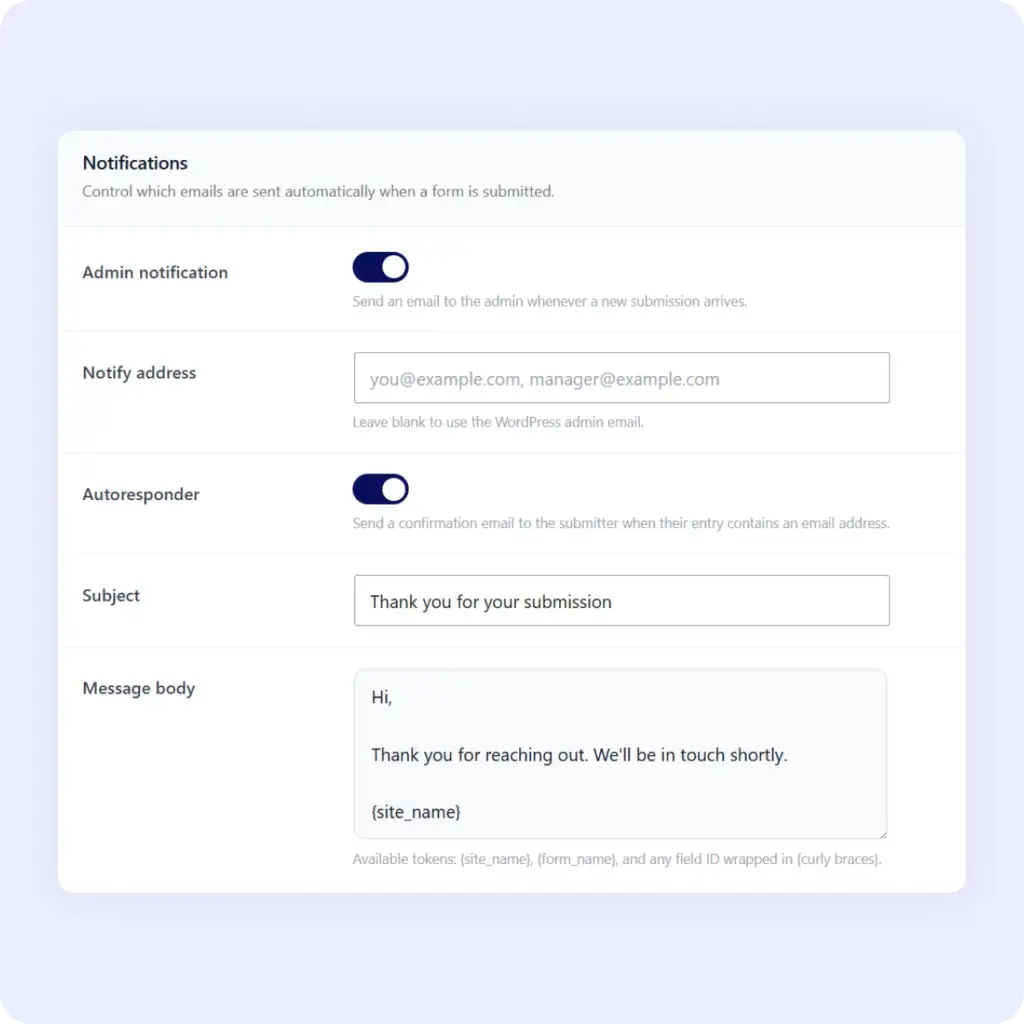
Notify your team and respondents the moment all steps are completed
When someone completes every step and hits submit, two things happen in real time: you get an admin notification email with the full multi-step submission, and the respondent receives a customizable thank-you autoresponder, fully automated.
Third-party integrations
Send multi-step form data to 6 platforms automatically
Connect multi-step forms to the tools your team uses. Built directly into Starter and Agency plans. No manual webhook setup required.
HubSpot
Map any multi-step form field to a HubSpot contact property. Auto-map by field label and type, flag unmapped required fields, and push every submission to your CRM the moment it arrives.
Google Forms
Import any Google Form into Neural Forms with one click, or link an existing Neural Form to a Google Form for metadata tracking. Your Neural Form schema stays untouched.
Send a WhatsApp notification to up to 10 recipients the moment a multi-step form is submitted. Pick an approved template and Neural Forms routes it via the WhatsApp Business API automatically.
Mailchimp
Add form respondents to a Mailchimp audience automatically. Map form fields to merge tags and build segmented lists from your submission data. No copy-paste, no CSV upload.
Zapier
Trigger any Zapier workflow the moment a multi-step form is submitted. Route data to Slack, Notion, Airtable, Google Sheets, or 6,000+ other apps. No custom webhook code required.
Neural Forms AI
Zero-config AI infrastructure. Add your free API key in Settings. Neural Forms handles model routing, credit management, and response processing automatically.
Security
Secure multi-step forms built for privacy
Multiple layers of protection to keep every step of your form submissions authentic and your respondents’ data safe.
Cloudflare Turnstile
Privacy-friendly invisible CAPTCHA that validates real visitors without challenges or puzzles.
reCAPTCHA v2
Google’s “I’m not a robot” checkbox. Spam protection used by millions of sites.
Neural AI spam detection
AI analyzes form submissions for spam patterns. Adjustable threshold (60 to 100) with suggest or auto-move modes.
Privacy mode
Skip IP and user-agent storage entirely. GDPR-friendly by design, enable with a single toggle.
Email notifications
Get admin notifications for every multi-step form submission in real time. Auto-send confirmation emails to respondents.
Dashboard analytics
At-a-glance stats: total submissions, completion rates, AI processing status, and per-form breakdowns inside WordPress.
Neural Forms
Ready to build your first multi-step form?
Multi-step forms are available in the free Neural Forms Lite version. Download from WordPress.org to start building. Upgrade to Starter ($99/year) or Agency ($199/year) to unlock AI spam detection, the Divi 5 module, all 5 native integrations, and premium AI tiers.
30-Day Money Back Guarantee. No Questions Asked!