
Neural Forms AI
The AI infrastructure that powers every Neural Forms feature
Neural Forms AI is the hosted AI service behind every AI feature in the plugin: submission analysis, draft replies, spam detection, AI form generation, polish, and reanalyze. Add your free API key in Settings, and Neural Forms handles model routing, credit management, and response processing automatically. No model configuration, no infrastructure to maintain, no third-party AI keys to manage.
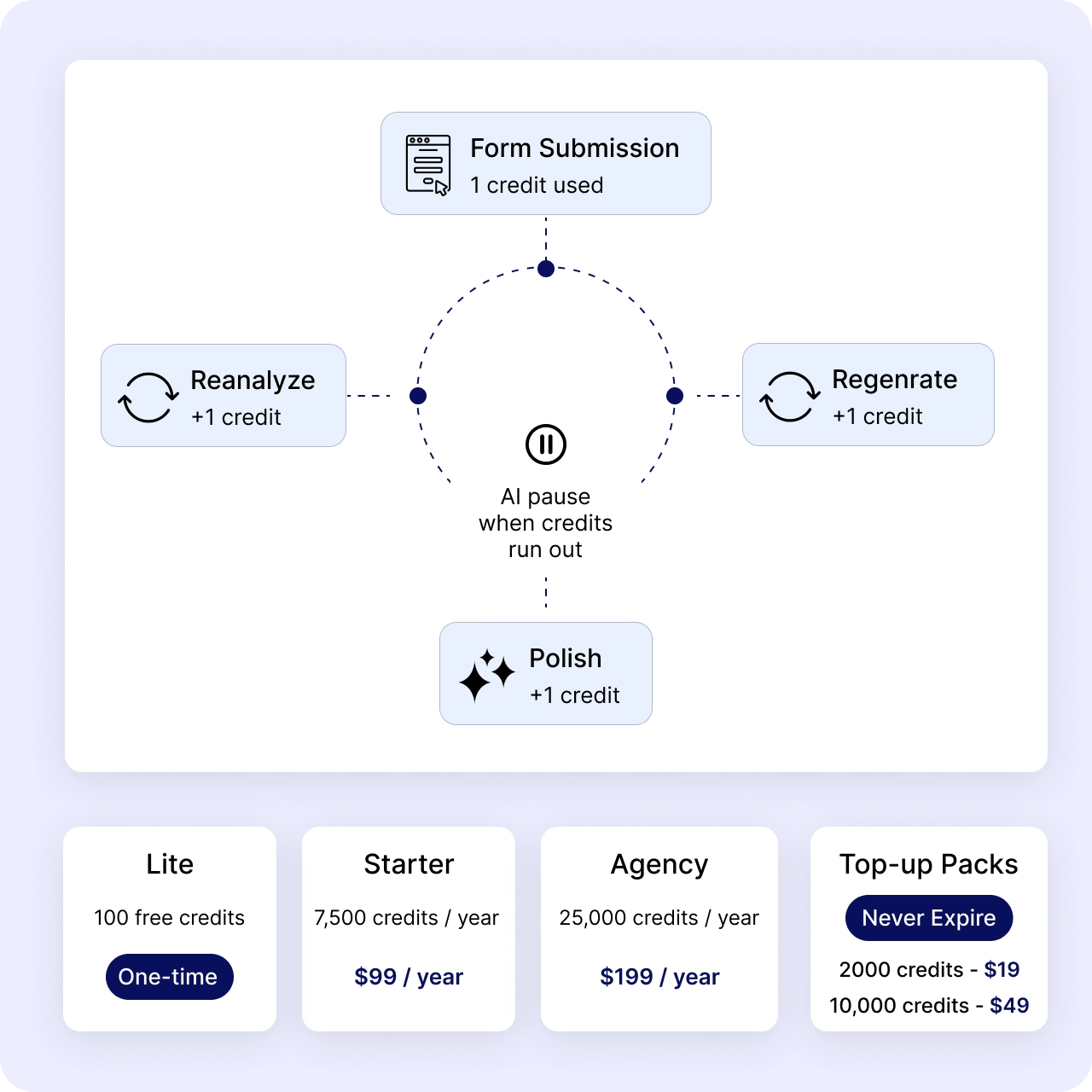
100 free AI credits on signup with Neural Forms Lite. 7,500 credits per year with Starter ($99/year). 25,000 credits per year with Agency ($199/year).
Features
Everything AI does inside Neural Forms
AI form generation
Describe your form in plain English and the AI builds the entire structure: fields, validations, labels, descriptions, and multi-step layout in seconds. Available in Starter and Agency. Edit the generated form freely in the builder before publishing.
Submission analysis on every entry
Every form submission is analyzed automatically. The AI generates a one or two sentence summary, assigns a category (sales, support, inquiry, complaint, spam, other), calculates a priority score from 0 to 100, and detects spam. Results appear on the entry in the lead inbox within seconds.
Auto-drafted replies
After analyzing each submission, the AI drafts a reply ready to review and send from the lead inbox. The draft uses the site context, the submission content, and your previous reply patterns to generate a relevant first response. Edit before sending or send as-is.
Polish and refine drafts
One-click polish rewrites your draft reply with improved tone, grammar, and professionalism. The AI keeps your intent and core message intact while smoothing the wording. Useful when the draft is mostly right but needs a quick edit. Available in Starter and Agency.
Site profile scraper
The AI scrapes your homepage and key pages monthly to learn about your business: what you offer, who you serve, your tone of voice. This context makes every reply, summary, and category specific to your site, not generic AI output. Available in Starter.
Smart spam detection
AI-powered spam scoring on every submission with adjustable threshold from 60 to 100. Choose suggest mode (flag for review) or auto-move (straight to spam folder). Suppresses notification emails for AI-flagged spam. Available in Starter and Agency.
AI processing dashboard
Track AI credit usage, processing status per entry, model tier distribution, queue health, and per-form AI activity. All from inside the Neural Forms dashboard in WordPress. Stats include credits used this month, credits remaining, average processing time, and spam-flagged entries.
How It Works
From zero to AI-powered in 60 seconds
No API keys to generate from external providers, no model configurations to learn, no infrastructure to manage. One Neural Forms API key, generated free at neuralforms.ai, and AI features work across all your sites.
1
Install Neural Forms
Install Neural Forms Lite (free) or Pro on your WordPress site. AI connectivity is built into both versions. No extra plugin to install, no separate AI integration to configure.
2
Generate your API key
Create a free account at neuralforms.ai. Go to your account dashboard and click Generate API Key. Your account starts with 100 free AI credits as a one-time allocation. No credit card required.
3
Add your API key in WordPress
In WordPress, go to Neural Forms > Settings > AI and paste your Neural Forms API key. Click Test Connection. A green confirmation appears when the connection works, and the AI controls unlock throughout the plugin.
4
Submit a form to see AI in action
Every submission is now queued for AI analysis. Within seconds, you see the summary, category, priority score, and draft reply on the entry in the lead inbox. AI processing runs asynchronously, so visitors never wait for AI to respond before their form submission completes.
Multi-tier AI models
Fast, Balanced, Smart, and Premium model tiers
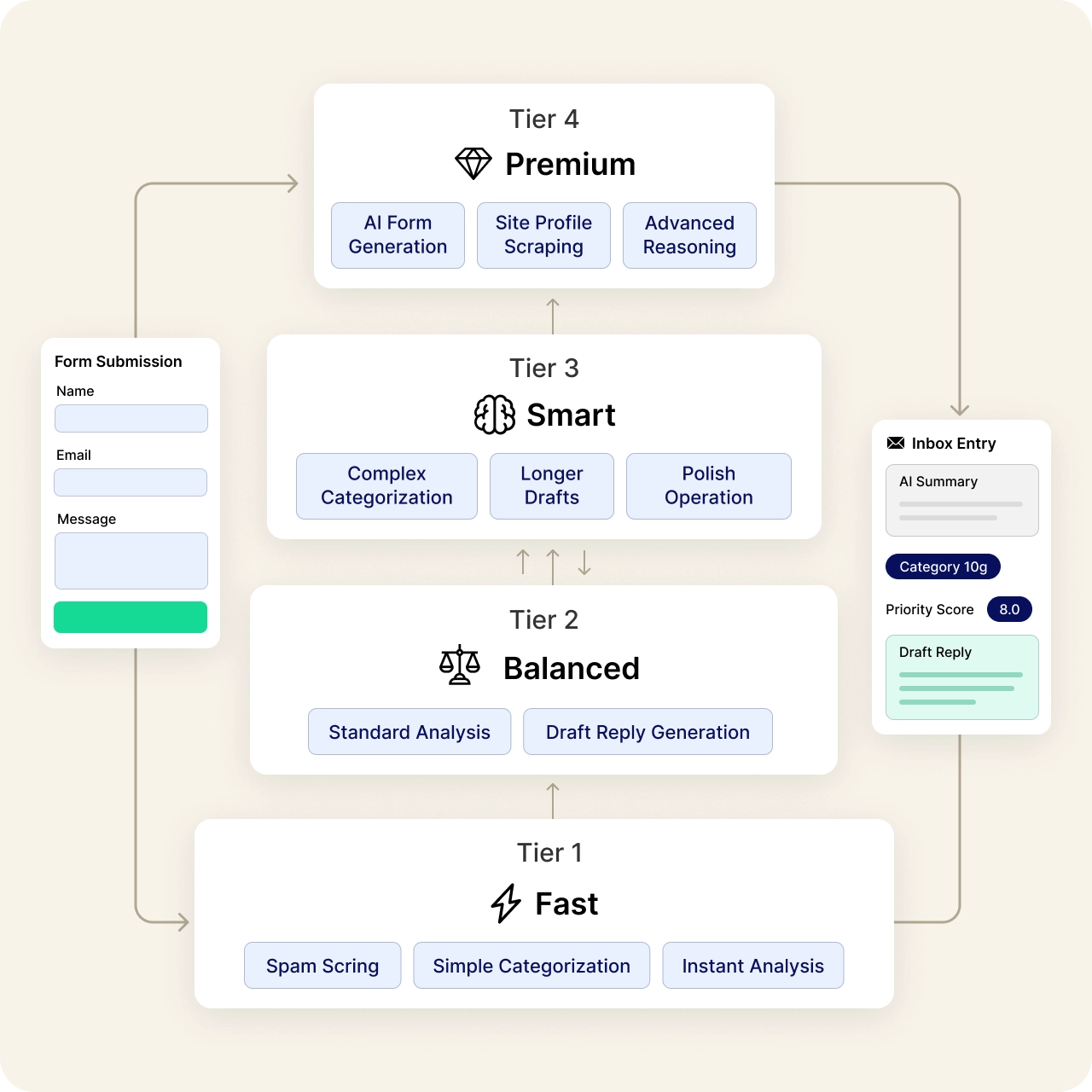
Neural Forms AI runs a multi-tier model ladder. Different operations route to different model tiers based on what’s needed: quick checks use Fast, complex analysis uses Smart, and creative drafting uses Premium. The plugin handles tier selection automatically, so you don’t pick models or worry about which works best.
Lite uses the Fast tier exclusively. Starter and Agency unlock all four tiers automatically. Tier routing is invisible to the user; results land in your inbox regardless of which tier processed each request.
Credit consumption
How AI credits work
One AI credit processes one form submission, including the analysis, category, priority score, and draft reply. Re-running operations on the same submission (reanalyze, regenerate, polish) consumes additional credits, one per action.
When credits run out on Lite, AI features pause. The form builder, lead inbox, email notifications, CAPTCHA, and CSV export continue working without any limit.
Use Cases
How teams use Neural Forms AI
If you’ve been using Google Forms because it’s free and easy, here’s why teams switch to Neural Forms.
Lead triage at scale
High-volume contact forms generate hundreds of submissions per week. AI categorizes each lead (sales, support, partnership), scores priority by buying signals, and flags spam. The sales team sees only high-intent leads first in the inbox, dramatically reducing time-to-first-response.
Customer support pre-triage
Support request forms collect tickets across categories. AI assigns the category, calculates priority, and drafts a first response. Support agents start with a categorized, prioritized inbox plus a draft reply, cutting response time and improving consistency.
Spam protection without CAPTCHA fatigue
Standard CAPTCHA tools annoy real users and miss sophisticated spam. The AI spam detection analyzes submission content directly, catching pattern-based spam that CAPTCHA misses. Adjustable threshold lets you balance false positives versus catches.
Form generation for content teams
Marketing or content teams build new forms frequently for campaigns, lead magnets, or landing pages. AI form generation lets them describe the form in plain English and get a working form in seconds, no form-builder expertise required.
Multilingual submission handling
Forms collecting submissions in multiple languages benefit from AI analysis that works across English, Spanish, French, German, Portuguese, and more. Summaries and categories are generated regardless of the submission language.
Security and privacy
Your data, processed securely and not retained
Neural Forms AI is designed with privacy at its core. Submission data is processed securely, results are returned to your WordPress site, and we do not retain submission content on our servers beyond what is required for analysis.
Encrypted in transit
All data between your WordPress site and Neural Forms AI travels over HTTPS with TLS 1.3 encryption. Submission content is never exposed in plain text during transit.
No long-term data retention
Submissions are processed and results returned. Neural Forms AI does not store your form data, respondent personal information, or submission content on our servers beyond the brief processing window. Security and abuse logs are kept for 90 days with redacted content previews (first 100 characters) for compliance purposes only.
No training on your data
Neural Forms AI does not train models on your submission data. Your form content, respondent information, and AI prompts are not used to improve AI models for other customers.
GDPR-friendly with Privacy Mode
Enable Privacy Mode in Neural Forms Settings to skip IP and user-agent storage on submissions. Run fully anonymous forms for employee surveys, feedback collection, or any privacy-sensitive use case. Privacy Mode does not affect AI processing of submission content.
Encrypted API key storage
Your Neural Forms API key is stored encrypted in your WordPress database and never exposed in API responses. Only WordPress administrators with the right capabilities can view or update it.
Site context stays on your site
The site profile scraper runs from the Neural Forms AI service, which fetches your homepage publicly the same way Google or any web crawler does. No installed code or background scripts run on your site for context gathering.
FAQs
Frequently asked questions about Neural Forms AI
No. Neural Forms AI is a hosted service operated by Elicus, and AI credits are included with your Neural Forms plan. You do not need an OpenAI API key, Anthropic API key, or any third-party AI subscription. The Neural Forms API key alone unlocks all AI features.
On Lite: AI features pause until you upgrade to Starter or Agency. The form builder, lead inbox, email notifications, CAPTCHA, and CSV export keep working without any limit.
On Starter and Agency: Purchase a credit top-up pack to continue using AI features through your billing year. Starter Credit Pack is $19 for 2,000 credits. Growth Credit Pack is $49 for 10,000 credits. Pack credits never expire.
Not currently. Neural Forms AI uses its own model routing infrastructure to deliver predictable AI quality across form types and use cases. Bring-your-own-key support is on the roadmap for Enterprise customers with specific compliance requirements.
Most AI operations complete within two to five seconds. Form generation takes longer (typically five to fifteen seconds for complex forms). Processing is asynchronous, so visitors never wait for AI to respond before their form submission completes.
Neural Forms AI uses a multi-tier model ladder optimized for form-related tasks. The plugin handles tier routing automatically based on the operation type. Specific model details are not exposed because the routing logic and model selection are part of how Neural Forms delivers consistent quality. Tier selection can change as better models become available, with no plugin updates required on your end.
Yes. Neural Forms AI supports submission analysis in English, Spanish, French, German, Portuguese, Italian, Dutch, and many other languages. Summaries and categories are generated in the same language as the submission. AI form generation currently works best with English prompts.
No. Neural Forms AI does not train models on your submission data. Your form content, respondent information, and AI prompts are not used to improve AI models for other customers or shared with upstream AI providers for training purposes.
Go to Neural Forms > Settings > AI and remove your API key, or simply do not connect a key in the first place. The form builder, lead inbox, email notifications, CAPTCHA, and CSV export work without any AI. AI is opt-in by design.
Yes. The data sent to Neural Forms AI is: the submission text, the field labels and types, optional site context (if the site profile scraper is enabled), and the operation type (analyze, draft, polish, etc.). The plugin does not send IP addresses, WordPress admin credentials, or WordPress core data to the AI service.
Neural Forms AI runs on Hetzner cloud infrastructure with primary servers in Ashburn, Virginia. Encrypted backups are stored separately. All data transfer uses TLS 1.3.
More Integrations
Explore other Neural Forms integrations
HubSpot
Auto-map form fields to HubSpot contact properties. Sync submissions to your CRM in real time.
Mailchimp
Sync form respondents to Mailchimp audiences with merge tag mapping and tag-based segmentation.
Zapier
Trigger any of 6,000+ app workflows on form submission. Connect to Slack, Notion, Airtable, and more.
Send WhatsApp notifications to up to 10 recipients via the WhatsApp Business API.
Neural Forms
Ready to add AI to every form submission?
Download Neural Forms Lite for free with 100 AI credits included on signup. Upgrade to Starter ($99/year) for 7,500 AI credits and Pro AI features, or Agency ($199/year) for 25,000 AI credits. Both Pro plans cover unlimited sites.
30-Day Money Back Guarantee. No Questions Asked!